





Quick answer: which alternative should you choose?
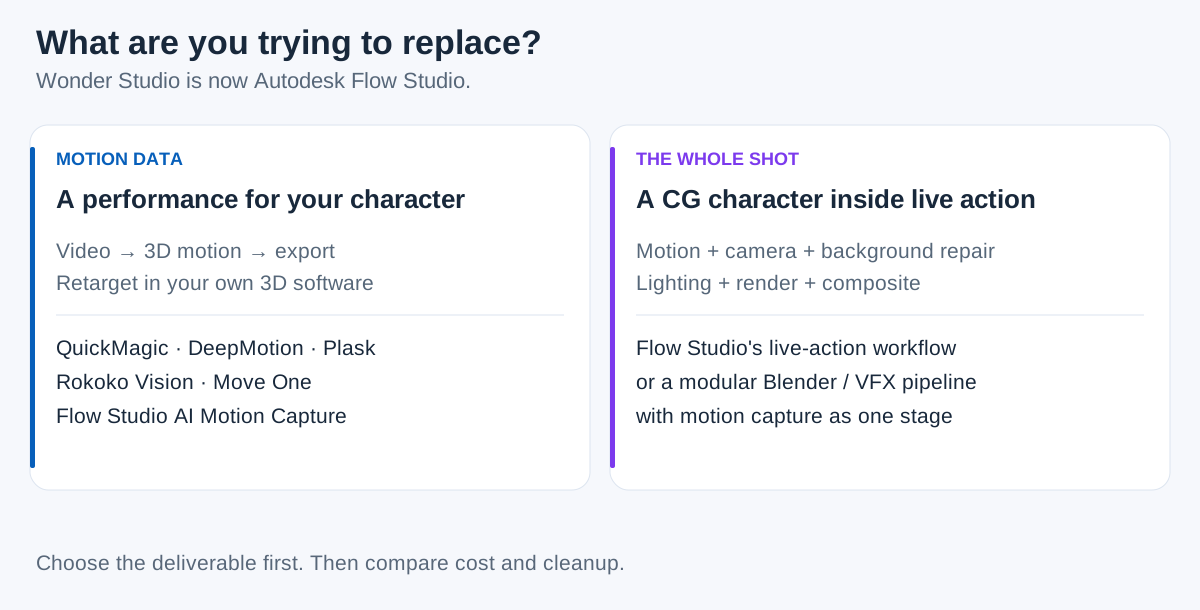
QuickMagic is worth shortlisting when your deliverable is editable 3D motion. DeepMotion, Rokoko Vision, Move One and Plask offer other capture-oriented workflows. For a complete live-action shot with a CG character, evaluate Flow Studio itself or a modular VFX pipeline such as Blender plus your chosen motion source.
There is no single "best Wonder Studio alternative" for every project. A game animator looking for FBX motion, an MMD creator needing a specific output format, and a filmmaker replacing an actor inside footage are buying different results.
This guide compares documented capabilities and workflow fit. It does not claim that one solver produces cleaner motion than another, and the videos below are vendor demonstrations—not a matched-footage benchmark.
What happened to Wonder Studio?
Wonder Studio was not shut down; it continues as Autodesk Flow Studio. Autodesk announced its acquisition of Wonder Dynamics, the company behind Wonder Studio, in May 2024. Its current product documentation identifies Flow Studio as the renamed product. Read Autodesk's acquisition announcement and current Flow Studio overview.
That matters when you search for a Wonder Dynamics alternative: a new name or Autodesk sign-in page is not by itself evidence that the service has disappeared. First check whether the current product already handles your project, then compare other tools against the output you actually need.
Motion capture and a finished shot are not the same deliverable
Motion data describes a character's movement. A finished VFX shot also needs the CG character to sit convincingly inside footage. Depending on the shot, that can involve camera reconstruction, background repair, occlusion, lighting, rendering and compositing.
Flow Studio covers both motion capture and broader production workflows. Autodesk documents editable motion exports as FBX or USD, alongside scene and live-action tools. It should not be described as useful only for compositing, or as requiring Maya for every downstream task. Check the current feature breakdown.
The best alternatives by use case
These are scenario-based recommendations, not a numerical ranking. All capture candidates should be tested with your own footage and delivery character.
| Candidate | Best reason to evaluate it | Important boundary |
|---|---|---|
| QuickMagic | Export-oriented video mocap, with a separate text-to-animation workflow | Confirm plan-specific formats; motion exports do not constitute a complete VFX shot |
| DeepMotion Animate 3D | Video capture with pose and contact-refinement controls | Test the settings and character workflow; additional capture options affect credits |
| Rokoko Vision / Create | Video motion creation with a path into Rokoko Studio and its broader ecosystem | Check which editing, retargeting and export features need a paid tier |
| Move One | Single-camera capture with platform uploads and iOS capture workflows | Do not confuse it with Move.ai's multi-camera studio products |
| Plask | Browser-based motion and scene work, including collaboration | Check extraction-version limits; API and Live setup are separate considerations |
| Blender + a modular pipeline | Detailed control over character animation, camera work and compositing | You assemble the workflow and supply motion capture or animation yourself |
Official product references: QuickMagic, DeepMotion, Rokoko Vision, Move One, Plask, and Blender VFX.
1. QuickMagic: shortlist it for motion-first projects
QuickMagic makes sense to evaluate when your destination is your own animated character, not an automatically composited version of the original video. The practical test is straightforward: process a short performance, download the motion, and use it in your target application.
Its paid video export list includes FBX, BVH, BIP and VMD, among other application-oriented options. The checked free tier lists FBX. If a specific format is the reason you want to switch, verify that the selected plan and capture mode include it. See QuickMagic's export and plan table.
Where it can fit your workflow
- Game or character animation: obtain motion to test on a rig in your existing production pipeline.
- Format-specific delivery: investigate the appropriate paid output when a team requests something beyond your usual FBX handoff.
- New motion ideas: try the separate text workflow when you want generated movement rather than reconstruction of a filmed performance.
Text-to-animation and video mocap solve different problems. A prompt can describe an action, but it does not preserve a particular recorded actor's performance in the way a capture workflow attempts to do.
Where it does not replace the whole job
If your brief is "replace the person in this live-action shot with our robot," a motion file is only one input. You still have to prepare the robot, align the performance, reconstruct or match the camera, handle background visibility, light the CG element and finish the composite.
Choose QuickMagic when that separation is useful—for example, because your team already does scene assembly and rendering elsewhere. Do not assume it will always be cheaper or more accurate than Flow Studio without comparing a complete deliverable.
Five other approaches worth comparing
2. DeepMotion Animate 3D: capture and refinement controls
DeepMotion documents body, hand and face options together with tools such as Rotoscope Pose Editor, Foot Locking and motion smoothing. Its published outputs include FBX, BVH, GLB and MP4, with details dependent on the character workflow. Review Animate 3D.
Evaluate it when correcting a take is central to your task. Test a planted foot, a direction change or an occluded limb and record how long it takes to reach an acceptable result. The presence of a correction tool does not prove that every difficult take can be repaired.
DeepMotion's SayMotion is a separate text-to-animation product. Keep its pricing and capabilities separate from the Animate 3D video workflow when drawing up a shortlist.
3. Rokoko Vision: a path through Create and Studio
Rokoko's current Vision 3.0 page places video motion capture inside Rokoko Create, with clips taken into Rokoko Studio for editing and export. This is worth evaluating if you want a motion workflow that can later connect with the company's hardware ecosystem. See the current Vision workflow.
Check the handoffs between products instead of assuming everything happens in a single browser page. Your trial should include importing, retargeting and exporting the final clip—not just generating it. A hardware upgrade path is useful only if it matches your future needs.
4. Move One: a single-camera option, not mobile-only
Move One's knowledge base covers platform uploads as well as iOS capture. Its export documentation lists FBX, USDC, USDZ and BLEND, with Blender 4 or newer required for the BLEND route. Browse Move One workflows and export formats.
This makes it a candidate for users assessing a particular import pipeline, not only people recording on a phone. Move.ai's studio systems are a separate evaluation involving a different capture setup; do not compare a studio demonstration with a phone upload as if the conditions were identical.
5. Plask: browser-based scenes and collaboration
Plask combines video mocap with scene work in the browser and lists FBX, BVH and GLB animation exports. If you want to apply motion to a character and share a scene before moving elsewhere, the surrounding workspace may matter as much as the capture step. Explore Plask.
Plask also publishes current API and Live documentation. It should not be dismissed using an older claim that development stopped in 2024. Its API documentation describes video jobs and real-time pose streams; these have separate setup considerations from a basic browser capture.
6. Blender: build a modular replacement pipeline
Blender includes camera and object tracking and a node-based compositor. It can therefore provide important parts of a manually assembled VFX pipeline around imported motion. It is not, by itself, an automatic replacement for an end-to-end actor-replacement service. Review Blender's VFX tools.
This route fits teams that want detailed control and can supply the missing expertise. Pair a suitable motion source with character setup, tracking, animation cleanup, lighting, rendering and compositing. Saving on a service subscription does not remove those production tasks or their time cost.
When staying with Flow Studio makes more sense
If your actual need is a coordinated live-action package, evaluate Flow Studio before rebuilding the same stages across several tools. Autodesk documents camera tracking, clean plates, alpha masks and character passes, as well as scene exports. Which elements you can obtain depends on the plan and project type. Read the product overview.
Staying can be the sensible choice when the integrated handoff saves more work than another tool's lower subscription price. Switching can be sensible when a different format, workflow or motion result better matches the job. Neither conclusion follows from a brand name alone.
Also avoid the blanket claim that Flow Studio has no text input. Its current tools include text-to-3D asset generation. Generating a model from text is not the same as generating a motion sequence from text; that distinction should guide a feature comparison. See the specific text and animation features.
Free options: compare usable exports, not headline allowances
Free access is useful for proving a pipeline. It is not necessarily permission to complete paid client work, and a credit is not a universal unit shared by every provider.
| Tool | Public free-access snapshot | Important check |
|---|---|---|
| QuickMagic | 50 VCoins; FBX output listed | Free use is non-commercial; paid formats differ |
| Flow Studio | 300 monthly credits; the checked free tier lists mocap export, 720p maximum video resolution and one-person capture | Confirm current project/export entitlement; video resolution is not a mocap-accuracy score |
| DeepMotion | 25 monthly credits on the current Animate 3D plan table | Non-commercial free access; processing options affect usage |
| Rokoko Vision | 30 seconds of monthly video processing; Starter lists FBX export | Check Studio requirements, custom-character features and BVH entitlement |
| Move One | One-time 30-credit trial | Not a recurring monthly free allowance |
| Plask | 15 seconds daily | Confirm license and required extraction options |
Checked October 13, 2026. Sources: QuickMagic, Flow Studio, DeepMotion, Rokoko, Move One, Plask.
For paid access, compare prices in the same currency and on the same billing basis. Check annual commitments, included processing, storage, character uploads, optional hand or face processing and commercial rights. Confirm the current checkout price rather than carrying an older promotional price into your budget.
If the final deliverable is motion only, some terms drop out. If it is a finished shot, leaving them out makes an apparently cheaper alternative look better than it really is.
See the motion-stage workflows
These official demonstrations illustrate two capture-oriented alternatives. They are not Flow Studio replacement tests and do not show every task needed to composite a CG character into a shot.
QuickMagic video-to-animation demonstration
Plask video-to-3D-motion demonstration
For the broader shot workflow, compare these with the examples on Autodesk's Flow Studio page rather than assuming an animation preview and a composited shot represent the same output.
How to test a Wonder Studio replacement
- 01 · DEFINEWrite down the final deliverable.
- 02 · SHORTLISTSelect two tools that cover it.
- 03 · PROCESSUse the same representative footage.
- 04 · IMPORTTest the actual target character.
- 05 · FINISHComplete the remaining production steps.
- 06 · MEASURECompare usable output, time and total cost.
For motion-only work, inspect planted feet, turns, joint continuity and timing. Then check the skeleton mapping, rest pose, scale and root motion after import. A smooth preview on a vendor's character can still need substantial work on yours.
For a finished VFX shot, also inspect camera alignment, contact shadows, occlusion, background repairs and consistency across frames. Those issues are not measured by an FBX import test.
Use footage you have the rights to process, and keep an untouched copy. Save exports, processing settings, rig mappings and license records outside the provider's cloud. A portable archive makes future changes easier without assuming any service will remain unchanged forever.
Start with the motion you need
If editable animation is your goal, test QuickMagic on one short performance and open the export in your production scene before committing to a plan.
Convert video to 3D animationFrequently asked questions
What happened to Wonder Studio?
Wonder Studio continues as Autodesk Flow Studio. Autodesk acquired Wonder Dynamics in 2024. The change in product name is not a shutdown, and current Autodesk pages document motion capture, live-action and scene workflows.
What is the best Wonder Studio alternative?
For motion exports, shortlist QuickMagic, DeepMotion, Rokoko Vision, Move One or Plask according to your required format and editing workflow. For a complete live-action CG shot, compare Flow Studio with a modular VFX pipeline rather than assuming a mocap service replaces every production stage.


