





What is the best RADiCAL alternative?
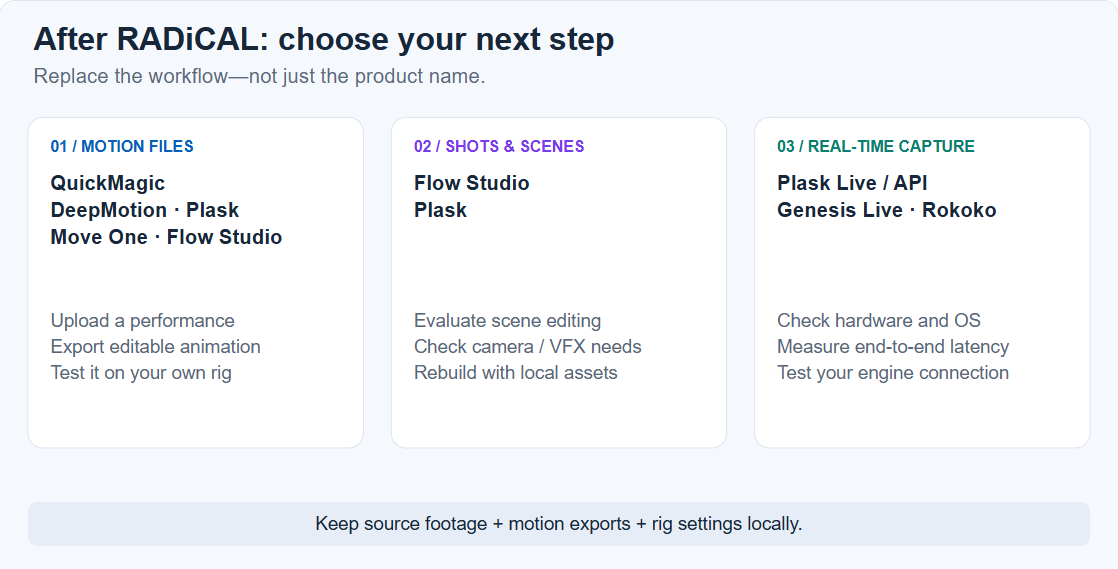
For video-to-animation exports, start by testing QuickMagic and one other candidate on your own footage. Flow Studio, DeepMotion, Plask and Move One are also viable tools to evaluate. If you depended on RADiCAL Live, compare real-time systems separately: uploading a recording and downloading FBX does not replace a live stream.
For former RADiCAL users, the immediate task is not finding the longest feature list. It is preserving what you already have, identifying the missing production step and proving that a replacement works with your existing characters.
This guide uses public transition reporting and official product documentation. It does not contain a matched-footage accuracy test, and it does not claim that any provider is immune to shutdown or future changes. Recommendations are based on workflow fit, not an unverified “best mocap” score.
What happened to RADiCAL?
RADiCAL announced that Autodesk acquired its core technology and intellectual property, including Motion—the technology behind Core and Live—and Canvas. Its announcement described alignment with Autodesk's Flow Studio roadmap and a transition period for the standalone platform. Read RADiCAL's announcement.
| When | What is documented |
|---|---|
| April 2026 | The technology acquisition and planned portal closure were reported. |
| July 6, 2026 | The announced closure and user-download deadline for the standalone portal. |
| October 13, 2026 check | The RADiCAL homepage redirects to Autodesk Flow Studio. |
The date and transition terms were reported by CG Channel, which also reported planned refunds for unused annual-subscription time. The current destination can be checked at RADiCAL's original domain.
Technology acquisition, product availability and account migration are three different things. An acquisition announcement does not mean that every former feature is available in the new product, that your subscription transfers, or that your old projects become accessible through a different account.
Can you recover your old RADiCAL files?
Start with copies you already control. The transition report said user data would not transfer to Autodesk and would be deleted after the download window. No current recovery route was verified for this guide. Treat any recovery request as uncertain, not as the basis of a production schedule. See the reported data policy.
- Search your project archive: downloads, external drives, shared team folders and delivery packages may contain FBX files or source footage.
- Open existing 3D projects: a Blender, Maya or engine project may already contain an imported animation, even if the original download is missing.
- Ask collaborators for copies: an animator or technical artist may have retained the rig, baked animation or intermediate scene.
- Review previous support correspondence: use known official contact channels if you need clarification, without assuming restoration is possible.
Make copies before changing anything. A saved FBX is a local asset, not merely a link to a cloud account. Its usefulness depends on what was exported and whether your software can read it. Autodesk documents FBX as an interchange format that can carry animation and other scene information. Read the FBX format overview.
RADiCAL alternatives: choose by the job you need to do
The table below is a shortlist, not a ranking. Plan limits, export availability and commercial rights should be checked before committing to a migration.
| Candidate | Why evaluate it? | What to verify first |
|---|---|---|
| QuickMagic | Upload a video and export editable character motion; paid video plans list FBX, BVH, BIP and VMD among their options. | Required export, commercial license and target-rig compatibility. |
| Autodesk Flow Studio | AI motion capture plus broader scene, camera and VFX workflows; documented FBX and USD motion exports. | Project type, export entitlement and whether you need motion only or complete scene elements. |
| DeepMotion Animate 3D | Video mocap with body, hand and face options, pose editing and contact controls. | Capture settings, credit consumption and the cleanup your footage needs. |
| Plask | Browser scene work with FBX, BVH and GLB animation exports; separate API and Live workflows. | Scene requirements, extraction version and any native Live setup. |
| Move One | Single-camera workflow with platform uploads and iOS capture options. | Selected processing model, output rig and export route. |
Official references: QuickMagic plans, Flow Studio features, Animate 3D, Plask, Move One documentation.
What about free plans?
Use free access to test an export, not just a preview. QuickMagic's checked free tier lists 50 VCoins, FBX output and non-commercial use. Its broader paid format list should not be advertised as free-tier functionality. Confirm the current plan limits.
Flow Studio, DeepMotion and Plask also publish free-access options, but an allowance is not a promise of unrestricted exports or commercial use. Compare the actual processing and download entitlements in your account. Keep annual-equivalent pricing separate from monthly billing, and include the time spent correcting each result.
Check Flow Studio access options, DeepMotion pricing, and Plask pricing. For Plask, confirm commercial-use conditions against its terms.
Using QuickMagic as a RADiCAL Core alternative
If your former workflow was “upload a performance, download motion, animate my own character,” QuickMagic is a sensible candidate to test. The similarity is in the task sequence; it is not evidence of identical skeletons, identical tracking or better accuracy.
Run a small end-to-end test
- Choose one representative source video. Use a take containing a turn, a stop and the type of body movement your project actually needs.
- Process the video in QuickMagic. Select only the capture options available and relevant to your plan. Keep the original footage unchanged.
- Inspect the motion before exporting. Watch floor contacts, sudden pose changes, limb crossings and the beginning and end of the take.
- Export for your destination. Start with the format and preset your receiving pipeline expects.
- Retarget and review on the final character. Check scale, rest pose, root movement, timing and any hand or face channels separately.
QuickMagic's video-to-3D animation page explains the capture workflow. The essential migration test is not whether the online preview looks good; it is whether you can open and deliver the exported animation in the application you already use.
Keep format choice practical
FBX is a reasonable interchange starting point. BVH is useful when your pipeline expects skeletal motion data, while BIP is a Biped-oriented format used by 3ds Max Character Studio. Choosing BIP does not make it a general-purpose replacement for every kind of 3ds Max rig. See Autodesk's Character Studio format definitions.
QuickMagic also has a text-to-animation workflow. It can help generate new movement ideas, but it does not recover a missing RADiCAL performance. Reconstructing a lost take from source footage and generating a new take from a prompt are different jobs.
Should you move to Autodesk Flow Studio?
Flow Studio deserves a place on the shortlist because of the technology's stated direction and its current animation tools. However, it is a separate service, not a promise that a former RADiCAL account, scene or license has migrated.
Do not dismiss it as a character-replacement-only product. Autodesk documents a dedicated AI motion capture workflow with editable FBX or USD exports. Evaluate that route if you need motion files; evaluate its wider scene and live-action tools if you also need camera tracking, clean plates or compositing elements. Review the official feature breakdown.
Ask the same practical questions you would ask any alternative: Can this plan produce the deliverable I need? Does the exported skeleton work with my target character? Are its additional scene tools useful, or would a simpler capture-and-export workflow suit this project better?
The useful distinction is which project type you choose, not “Autodesk for VFX, every other tool for motion.” Make that decision using a sample export rather than a product label.
Replacing RADiCAL Live is a different decision
A short processing time is not the same as live capture. If your use case is an interactive avatar, a stage performance or a live engine connection, evaluate the complete streaming chain: camera input, processing, network transport, retargeting and display.
| Route | What is documented | Main tradeoff |
|---|---|---|
| Plask Live / API | Video jobs and real-time pose streams; native capture documentation specifies macOS 14 or later. | Check OS, network, credits and the destination integration. |
| Move.ai Genesis Live | Evolution of Move Live with Zcam support, live calibration and real-time preview. | A configured multi-camera studio workflow, not a simple webcam subscription. |
| Rokoko Studio ecosystem | Motion recording, editing and streaming with supported capture inputs and integrations. | Confirm hardware, software tier and streaming-plugin requirements. |
Official documentation: Plask API, Genesis Live release notes, Rokoko Studio.
Do not assume these are drop-in replacements for your old stream. Test the exact computer, camera, network and engine build you will use. Measure motion-to-screen delay, tracking loss and recovery, connection stability and whether the session can be recorded for later correction.
A prerecorded demonstration is not proof of live latency. Likewise, a hardware-based system may be suitable for a stage but unnecessarily complex for someone who only needs occasional FBX files.
Watch two video-to-animation workflows
These official clips illustrate alternatives for the recorded-video route. They are not RADiCAL recovery tools, live-stream demonstrations or a controlled comparison of capture accuracy.
QuickMagic video-to-animation demonstration
DeepMotion Animate 3D demonstration
A migration checklist you can actually finish
Use a small pilot before moving an entire animation library. Choose one familiar action and one difficult action, then run both through the same target rig. That exposes pipeline problems earlier than comparing a set of unrelated showreels.
- 01 · INVENTORYFind local footage, motion files and scenes.
- 02 · DEFINESpecify motion export, scene work or live input.
- 03 · TESTProcess representative footage in two tools.
- 04 · VALIDATERetarget onto the actual delivery character.
- 05 · CHECK RIGHTSConfirm footage, asset and output licenses.
- 06 · ARCHIVESave usable outputs outside the provider.
Write down your acceptance criteria
For a game locomotion clip, planted feet and reliable root motion may matter most. For a dialogue performance, upper-body timing and gestures may carry the scene. For stylized animation, an editable and consistent result may be more useful than a more detailed skeleton that is harder to retarget.
Record cleanup time, not just render or processing time. Check whether the chosen plan allows the input size, performer count and output format you need. A successful browser preview is only the first checkpoint.
Keep a portable project archive
project / take-001 /
  source-video.mp4
  original-motion.fbx
  retargeted-motion.fbx
  character-and-rig /
  working-scene /
  settings-and-license-notes.txt
  preview.mp4
This is a suggested organization, not a requirement of any service. Record frame rate, units, skeleton version, rest pose, chosen processing settings and any manual correction. Preserve an untouched export alongside the cleaned result.
Maintain a separate backup and test that you can reopen an archived take without signing into the capture provider. A cloud workspace can be convenient for active work; it should not be the only copy of an animation you depend on.
Where should former RADiCAL users go next?
Choose QuickMagic as a test candidate for a direct video-to-motion workflow. Compare it with DeepMotion, Plask, Move One or Flow Studio using your real delivery rig. Choose Flow Studio's wider tools when scene reconstruction or VFX elements are part of the job. For real-time performance, evaluate a streaming system separately.
The most valuable improvement is not simply changing vendors. It is building a workflow that keeps your footage, motion data and rig settings portable, so the next change in a service does not force you to start again.
Test the next workflow with one clip
Try QuickMagic with footage you own, check the result in your target application, and confirm the export and license you need before upgrading.
Try QuickMagicFrequently asked questions
Is RADiCAL shut down?
The standalone RADiCAL portal's announced closure date was July 6, 2026, following Autodesk's acquisition of its core technology and IP. As checked on October 13, 2026, radicalmotion.com redirects to Autodesk Flow Studio. This does not mean old RADiCAL accounts or projects were automatically migrated.
What is the best RADiCAL alternative for video-to-FBX?
QuickMagic is a useful starting point for an upload-video, export-animation workflow. DeepMotion, Plask, Move One and Flow Studio are also candidates. The best choice depends on your character rig, license, required output and cleanup time; this guide does not claim a tested accuracy winner.
Is Autodesk Flow Studio the same as RADiCAL?
No. Flow Studio is the Autodesk product to evaluate in the context of the technology's continuation, but it is a separate service. It supports AI motion capture and editable FBX or USD output as well as broader scene and VFX workflows. It is not simply the old RADiCAL portal with a new login.
Can I recover old RADiCAL files?
Do not assume that an Autodesk login restores them. The transition reporting said user data would not transfer and would be deleted after the download window. No current recovery route was verified for this guide. Check local exports, team backups and previous support correspondence before rebuilding.
Is there a free RADiCAL alternative?
Several candidates offer free access, but their limits and licenses differ. QuickMagic lists a free tier with FBX export and non-commercial use. A free test can help validate a pipeline, but it does not necessarily cover paid client work or every export format.
What can replace RADiCAL Live?
Evaluate a real-time workflow separately from file-based video mocap. Candidates include Plask Live or its real-time API, Move.ai Genesis Live, and Rokoko's hardware-and-Studio ecosystem. Their operating systems, hardware, network requirements and streaming integrations differ.
Will my old RADiCAL FBX files still work?
A locally saved FBX file is separate from the closed cloud portal and may still be usable in compatible software. Open it in a supported application and check its skeleton, frame rate, scale and animation. Keep the original unchanged before retargeting or converting it.
Can any cloud mocap tool guarantee it will never shut down?
No service should be treated as immune to closure, acquisition or changes in access. Reduce disruption by keeping source footage, exported motion, character assets, retargeting settings and license records in a portable local archive with a separate backup.


