In This Guide
Motion capture used to mean a studio, a suit, and a six-figure budget. In 2026, it means a phone camera and a browser tab. This guide explains what AI Motion Capture is, how it works, and the core technologies behind it—then shows why QuickMagic has become the go-to free platform for creators who want to turn any video or text prompt into ai 3d animation in minutes.
Whether you are an indie animator, a game developer, a VTuber, an MMD creator, or part of a robotics team, this is the only explainer you need to understand the space and start producing production-ready motion today.
Table of Contents
What Is AI Motion Capture?
How AI Motion Capture Works (Step-by-Step Pipeline)
Core Technologies Behind AI Motion Capture
Markerless vs Traditional Motion Capture
Why Creators Choose QuickMagic
Best AI Motion Capture Tools in 2026
Use Cases & Industries
Benefits of AI 3D Animation
How to Choose the Right Tool
Getting Started with QuickMagic (Free)
Frequently Asked Questions (FAQ)
Conclusion
What Is AI Motion Capture?
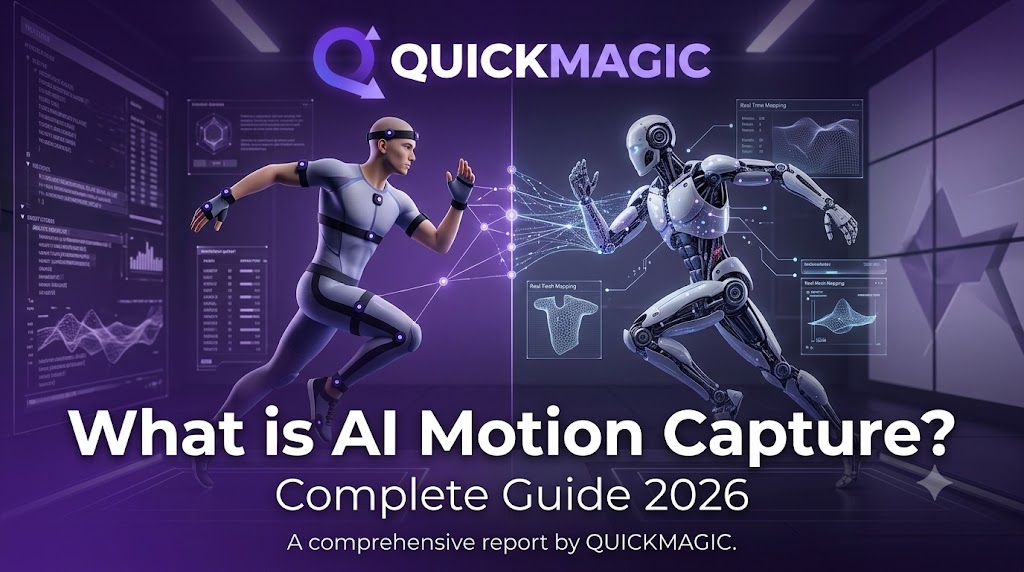
AI Motion Capture (also called AI mocap or markerless motion capture) is the process of converting ordinary video recordings, text prompts, or live webcam feeds into structured 3D skeletal animation data using machine learning models — without attaching reflective markers, wearing an inertial suit, or setting up an optical camera array.
The simplest definition: it is the bridge between real-world human movement and digital 3D animation. A dancer records a 15-second clip on their smartphone. A pose-estimation neural network analyzes every frame, detects joint positions (hips, knees, wrists, spine, fingers, facial landmarks), reconstructs a 3D skeleton, and outputs clean, editable motion data ready to drive any virtual character.
Figure 1: End-to-end AI Motion Capture pipeline — from video or text input to production-ready 3D animation data
Key Definition
AI Motion Capture
= Machine learning-based technology that extracts human motion from pixels (or natural language) and produces production-ready 3D animation files — replacing expensive hardware with algorithms.
Two foundational ideas define the modern AI motion capture category in 2026:
Markerless Motion Capture — No physical markers, sensor suits, or multi-camera optical rigs required. Any RGB camera (phone, webcam, DSLR) provides sufficient input.
Real-Time Body Tracking — The same pose estimation running as a live loop, enabling a digital character to mirror a performer instantaneously (used in VTubing, virtual production, interactive Digital Humans, and live game prototyping).
Together, these technologies remove the two historical barriers to entry in motion capture: cost and hardware complexity. Platforms like QuickMagic, DeepMotion, and Rokoko now let anyone start producing professional-quality 3D animation from their browser — completely free.
This shift has transformed who can create motion-driven content. Where motion capture was once exclusive to AAA studios, sports science labs, and biomedical research facilities, it is now accessible to indie animators, game developers, MMD (MikuMikuDance) creators, VTubers, robotics engineers, educators, and hobbyists alike.
How AI Motion Capture Works: The Full Pipeline
Under the hood, virtually every AI motion capture platform shares a common processing pipeline. Understanding these stages helps you diagnose output quality issues, choose the right tool for your project, and optimize your input footage for best results.
Capture (Input)
The process starts with an input source: a single RGB video file (dance, sports, acting, martial arts, reference footage), a live webcam stream, or a text description of the desired motion. Most modern tools accept all three — QuickMagic, for instance, lets you switch between video and text inputs inside the same project.
Pose Estimation (2D → 3D)
A deep learning model — typically based on architectures like HRNet, BlazePose, MoveNet, or proprietary transformer-based pose estimators — analyzes each video frame to detect 2D keypoints (joint positions in image space). Advanced models then lift those 2D coordinates into 3D space using temporal consistency across frames, producing a raw 3D skeleton per frame.
Solving & Refinement
The raw 3D skeleton is noisy: joints jitter, feet slide on the ground plane, limbs occasionally penetrate each other or the torso. The solving stage applies kinematic constraints, inverse dynamics, and temporal smoothing to produce physically plausible motion. Premium platforms (including QuickMagic) also handle:
Foot locking / ground contact — Prevents the "moonwalk" effect where feet appear to slide.
Self-penetration resolution — Stops limbs from passing through the body.
Jitter removal — Temporal filtering for smooth, usable curves.
Foot locking / ground contact — Prevents the "moonwalk" effect where feet appear to slide.
Self-penetration resolution — Stops limbs from passing through the body.
Jitter removal — Temporal filtering for smooth, usable curves.
Motion Retargeting
The solved motion is mapped from the source skeleton onto a target character rig. A dance recorded on a human performer can be transferred onto a stylized chibi MMD model, a Mixamo game character, an Unreal Engine mannequin, a VRM VTuber avatar, or even a humanoid robot skeleton — without re-recording anything. The quality of retargeting varies significantly between tools; QuickMagic supports an unusually wide range of target skeletons out of the box.
Export & Integration
The final animation is delivered in industry-standard formats: FBX (universal skeleton animation), BVH (biovision hierarchy), VMD (MikuMikuDance native), GLB/GLTF (web 3D), BIP (3ds Max/Cinema 4D), or engine-native formats (Unreal, Unity). From there, it drops directly into Blender, Maya, Unreal Engine, Unity, MikuMikuDance, iClone, Roblox Studio, or robot simulation environments.
Real-Time Variant
When steps 2–4 run in a continuous live loop (typically via WebRTC or WebSocket streaming), the system becomes
Real-Time Body Tracking
. This powers live VTuber avatars, virtual concerts, interactive Digital Humans, and real-time game animation prototyping. QuickMagic supports both offline (upload-and-wait) and real-time workflows depending on your plan tier.
Core Technologies Behind AI Motion Capture
The 2026 AI motion capture landscape is defined by six overlapping technology pillars. Understanding each helps you match the right tool to your creative goal — and reveals why QuickMagic covers more of them in a single free workflow than most competitors.
1. Video to 3D Animation
Converts recorded footage — dance, sports, acting, fighting, or any reference clip — into 3D animation data. This is the workhorse workflow for most creators because the input (smartphone video) is ubiquitous. QuickMagic captures body, hand, and facial motion from regular RGB footage with zero sensors, suits, or markers required.
2. Text to 3D Animation
Flips the paradigm: instead of uploading a clip, you describe an action, pose, or performance in natural language ("a joyful jump with arms raised, spinning twice") and a generative model synthesizes the motion from scratch. QuickMagic supports this natively so you can switch between video and text inputs mid-project — ideal when filming isn't practical.
3. Generative 3D Motion
The umbrella term for AI models that synthesize new motion rather than only tracking existing footage. Use cases include extending a short clip into a longer take, blending two different performances together, filling gaps in a broken recording, or generating transitions between poses. This is where the field is advancing fastest in 2026, and it's built into QuickMagic's editing flow.
4. Real-Time Body Tracking
Pose estimation running as a live inference loop, typically at 30–60 FPS. Powers virtual broadcasters (VTubers), live concerts, real-time game prototyping, and interactive Digital Humans that respond to a performer instantly. Requires lower-latency infrastructure than batch processing.
5. Motion Retargeting
What makes captured motion reusable across characters. A dance recorded on a human performer transfers onto a chibi anime model, a photorealistic game rig, or a humanoid robot — each with different proportions, bone counts, and joint limits — without re-recording. QuickMagic retargets onto an unusually wide range of skeletons: MMD, VRM, Mixamo, Unreal, Unity, iClone, Roblox, and robot formats (Unitree G1/H1).
6. Digital Humans
The destination application. AI motion capture supplies the lifelike body, hand, and facial movement that makes a virtual person believable in film, games, customer service avatars, metaverse experiences, and training simulations. QuickMagic exports motion data directly into the pipeline ecosystems where these Digital Humans live.

Markerless Motion Capture vs Traditional Optical Mocap
Understanding the difference between traditional motion capture (optical/inertial) and markerless AI motion capture is essential for choosing the right approach for your project. Neither is universally "better" — they serve different scenarios.

Markerless AI motion capture is
not trying to replace
high-end optical rigs for billion-dollar blockbuster films. What it IS doing is
expanding the total addressable market
of motion capture to
everyone with a camera
— and QuickMagic is built precisely for that expanded audience: MMD creators, indie game teams, VTubers, robotics researchers, and students who previously had no access to motion capture whatsoever.
Why Creators Choose QuickMagic in 2026
Among the growing field of AI motion capture tools, QuickMagic stands apart for one reason above all: it covers the broadest set of creator workflows in a single free platform. Here's what makes it the go-to choice for thousands of MMD creators, VTubers, game developers, and robotics engineers worldwide.
Completely free to start — Core AI motion capture (video input, text input, basic editing, and standard exports) costs nothing. Upgrade only when you need volume processing, advanced formats, or team features.
Video AND text in one tool — Both Video to 3D Animation and text to 3d animation work inside the same project. Switch inputs without switching apps or losing context.
Native MMD & VTuber support — First-class VMD export for MikuMikuDance, VRM compatibility for VTuber avatars, plus full-body, hand, and facial capture in a single pass.
Dance-first design — Purpose-built for dance, sports, acting, and fight choreography footage — the exact content types that drive the MMD and VTuber creator economy.
Widest format support — Exports to FBX, BVH, BIP, C4D, VMD, Mixamo, UE4/UE5, iClone, Roblox, and UniRobot (Unitree G1/H1). More formats than any other single-platform AI mocap tool in 2026.
Robotics & embodied AI — Generates human motion data specifically formatted for humanoid robots (Unitree G1/H1) for imitation learning and simulation — a capability almost unique among consumer-grade tools.
Complete pipeline in the browser — Capture → Estimate → Solve → Retarget → Edit (Generative 3D Motion) → Export. No downloads, no plugins, no GPU required on your end. Runs entirely in your browser tab.
In short: if your work touches MMD, VTubers, dance animation, game development, or robotics, QuickMagic is the most complete starting point available today — and it's free to try.
Leading AI Motion Capture Tools in 2026
We evaluated the top AI motion capture platforms across six dimensions: input flexibility, format coverage, price, ease of use, community/ecosystem, and specialty strengths. Here's how they compare.
QuickMagic Editor's Pick · Free
Best for: Creators who need the broadest workflow coverage in one place — especially MMD makers, VTubers, dance animators, game developers, and robotics teams.
QuickMagic is the only platform in 2026 that combines video-to-3d-animation and text-to-3d-animation with native VMD/Mixamo/robot export, hand + facial tracking, and generative motion editing — all free to start. Its MMD community integration is particularly strong, with thousands of active creators sharing QuickMagic-made motion data across YouTube Shorts, TikTok, Bilibili, Niconico, and X (Twitter).
Inputs: Video upload, text prompt, webcam (real-time on paid tiers)
Exports: FBX, BVH, BIP, C4D, VMD, Mixamo, GLTF, UE4/UE5, iClone, Roblox, UniRobot
Pricing: Free core tier; Pro plans for volume/advanced features
Unique strength: Only tool covering MMD + VTuber + robotics + generative editing simultaneously
Animate 3D (by DeepMotion) Video-Focused
Best for: Teams focused exclusively on video-to-animation workflows who need reliable body, hand, and face tracking with physics simulation.
DeepMotion's flagship product turns uploaded video into 3D character animation in the browser. Solid performance on body and hand capture with foot-locking and physics-based refinement. Format coverage is narrower than QuickMagic's (no native VMD or robot export), making it less suitable for MMD or robotics use cases.
Inputs: Video upload only
Exports: FBX, BVH, GLTF, UE4/UE5, Unity
Pricing: Freemium with credit-based consumption
Unique strength: Mature physics simulation and foot-ground interaction modeling
SayMotion (by DeepMotion) Text-Only
Best for: Ideation, storyboarding, and concept exploration when you have a clear vision but no reference footage.
Type a natural language prompt, select a character style, and watch the AI generate original 3D motion from scratch. Excellent for rapid prototyping and non-dancers who want to explore movement ideas. However, creators who also need video input, VMD export, or robot formats will need to pair SayMotion with another tool (like QuickMagic) for a complete pipeline.
Inputs: Text prompt only
Exports: FBX, BVH, GLTF
Pricing: Freemium with credit-based consumption
Unique strength: Pure text-to-motion generation with good prompt comprehension
Rokoko Vision Quick Previs
Best for: Indie developers and animators who need a fast, free way to rough out animations before committing to a more detailed tool.
Rokoko's free web-based motion capture tool accepts webcam feeds or video uploads and produces usable 3D animation quickly. Good entry point for newcomers to AI mocap, though feature depth (no text input, limited format options, simpler retargeting) makes it better as a supplementary tool than a primary pipeline.
Inputs: Webcam live, video upload
Exports: FBX, BVH (limited)
Pricing: Free tier available; Rokoko ecosystem upsells to hardware (Smartsuit Pro)
Unique strength: Zero-cost entry point with brand recognition in the mocap space
Other Notable Tools Worth Mentioning
Rokoko Smartsuit Pro — Hardware-software hybrid (inertial suit + AI cleanup). Higher accuracy than pure markerless but requires purchasing physical gear (~$2,500+).
Move.ai — Enterprise-focused markerless mocap with multi-camera support. Strong on accuracy but pricing targets studios, not individual creators.
Plask — Browser-based motion capture with a built-in 3D editor and community marketplace. Growing rapidly in the Asian creator market (especially Korea/Japan MMD scene).
MediaPipe Pose / OpenPose — Open-source pose estimation libraries for developers building custom mocap pipelines. No GUI, requires coding expertise.
Use Cases & Industries: Who Uses AI Motion Capture?
AI motion capture has spread far beyond its origins in film VFX and sports science. Here are the primary industries and creator segments driving adoption in 2026:
Game Development
Rapid prototyping of character locomotion, combat cycles, idle animations, and cinematic sequences. Indie teams replace weeks of manual keyframing with hours of AI capture. Major engines (Unreal, Unity) import FBX/BVH output directly.
MMD & Virtual Idol Content
Turning K-pop dance covers, original choreography, and viral TikTok dances into VMD motion files for MikuMikuDance. The largest organic user base of QuickMagic — thousands of creators share QuickMagic-captured motion across YouTube, TikTok, Bilibili, Niconico, and X daily.
VTubing & Live Avatar
Full-body, hand, and facial motion capture driving VRM/VRChat avatars in real-time. QuickMagic's combination of facial tracking + body tracking + VRM export makes it a favorite among independent VTubers who can't afford professional Live2D/FaceRig setups.
Film & Virtual Production
Previsualization (previs) for blocking scenes before committing to expensive shoot days. Digital Human animation for background characters, crowd scenes, and secondary roles. Directors explore staging options with AI-animated stand-ins.
Robotics & Embodied AI
Generating human motion reference data for imitation learning and simulation. QuickMagic's Unitree G1/H1 export format enables roboticists to train humanoid robots on realistic human movement patterns without building a motion capture lab.
Education & Training
Teaching animation principles, biomechanics, and motion analysis without requiring university labs to invest in six-figure optical mocap systems. Students learn by capturing their own movement and seeing it translated to 3D characters immediately.
Fitness & Sports Analysis
Analyzing athletic technique (golf swings, running gait, weightlifting form) through 3D skeletal reconstruction. Coaches identify inefficiencies and injury risk factors from smartphone video.
Medical & Rehabilitation
Gait analysis, posture assessment, and progress tracking in physical therapy. Patients record movement at home; clinicians review 3D skeletal data remotely. Lower cost than clinical motion analysis systems.
Benefits of AI-Powered 3D Animation
Why are creators switching from traditional keyframing and legacy mocap systems to AI motion capture? The benefits compound across the entire production pipeline:
Dramatically lower cost — Start for free with QuickMagic. No suit to buy ($1,000–$5,000), no studio to rent ($500–$2,000/day), no cameras to calibrate. The marginal cost of each new capture approaches zero.
10× faster iteration — Record, process, preview, edit, and export in a single session. What used to take days (suit-up → capture → solve → clean → export) now takes minutes. Iterate on choreography, timing, and expression until it's perfect.
Democratized access — Anyone with a smartphone can produce production-ready 3D animation. Geographic location, budget, and institutional affiliation no longer determine who gets to animate.
Creative flexibility — Combine Video to 3D Animation with Generative 3D Motion tools to extend clips, blend performances, remix styles, and experiment in ways impossible with traditional capture-or-keyframe-only workflows.
Cross-character reuse via Motion Retargeting — One captured performance drives dozens of different character rigs. Record once, apply everywhere. This multiplier effect is perhaps the single biggest productivity gain for teams managing large character rosters.
Lower skill floor for animation — Non-animators (dancers, actors, athletes) become motion sources. The person who performs the motion doesn't need to understand spline curves, inverse kinematics, or graph editors.
How to Choose the Right AI Motion Capture Tool
Not every tool fits every workflow. Ask yourself these four questions before committing:
❶ What is my input source?
Video only? → Animate 3D, Rokoko Vision, Plask, Move.ai
Text prompts only? → SayMotion, HY Motion
Both video AND text? → QuickMagic (only tool offering both natively)
Real-time/live webcam? → QuickMagic (Pro), Rokoko Vision, Plask
❷ What is my target output format?
Blender / generic 3D? → Almost any tool (FBX/BVH/GLTF universal)
MMD / VMD specifically? → QuickMagic (native VMD export, largest MMD community)
Unreal Engine / Unity? → All major tools (FBX/BVH support)
iClone / Cinema 4D? → QuickMagic (BIP/C4D), some others
Roblox? → QuickMagic (native Roblox export)
Humanoid robot (Unitree)? → QuickMagic only (UniRobot format)
❸ Do I need real-time performance?
Yes (live VTubing, virtual production, interactive apps): Prioritize tools with proven low-latency real-time body tracking. Check latency specs — anything over 100ms feels laggy to performers.
No (offline editing, batch processing): Cloud-based batch processing gives better quality per dollar. Upload, wait a few minutes, download clean results.
❹ What is my budget?
$0 (free forever core): → QuickMagic (most generous free tier), Rokoko Vision (basic free)
$20–$50/month: → DeepMotion (Animate 3D + SayMotion credits), Plask Pro
$100+/month: → Move.ai, Rokoko Smartsuit ecosystem, enterprise plans
$2,500+ one-time: → Rokoko Smartsuit Pro (hybrid hardware-AI approach)
Quick Recommendation
If your pipeline involves
MMD, VTubers, dance content, game prototyping, or robotics
— prioritize format support (VMD, Mixamo, robot rigs) above everything else. That's exactly where QuickMagic leads the market, with the added advantage of being
free to start
.
Getting Started with QuickMagic: Step-by-Step Guide
Ready to create your first AI motion capture? Here's the fastest path from zero to exported 3D animation using QuickMagic's free tier. Total time: under 10 minutes.
Sign up free at quickmagic.ai
Create your account — no credit card, no suit, no markers, no camera rig required. Just an email address and a browser.
Upload a video OR type a text prompt
Choose "Video to 3D Animation" and upload your footage (dance cover, sports clip, acting take, fight choreography — anything with visible human movement). Or choose "Text to 3D Animation" and describe the motion you want in plain English: "a confident walk forward, pause, then turn around and wave".
Review and refine the AI capture
QuickMagic's browser editor shows you the estimated body, hand, and facial motion in real-time preview. Use the built-in Generative 3D Motion tools to:
Extend a short clip into a longer take
Smooth jitter and remove noise
Fix foot sliding and ground penetration
Blend two different performances together
Fill missing frames or repair corrupted sections
All editing happens in-browser — no software installation needed.
Extend a short clip into a longer take
Smooth jitter and remove noise
Fix foot sliding and ground penetration
Blend two different performances together
Fill missing frames or repair corrupted sections
Retarget to your target character
Select your destination rig: MMD model (PMX/PMD), VRM VTuber avatar, Mixamo character, Unreal Engine skeleton, Unity prefab, iClone actor, Roblox character, or humanoid robot skeleton (Unitree G1/H1). QuickMagic automatically handles proportion differences and joint limit constraints during retargeting.
Export and integrate into your pipeline
Download the final animation file in your chosen format. Import directly into Blender, Unreal Engine, Unity, MikuMikuDance, iClone, Roblox Studio, or your robot simulation environment. The motion data is production-ready — no additional cleanup required for most use cases.
Iterate and reuse across characters
Because QuickMagic includes Motion Retargeting as a core feature, you can take the same captured performance and apply it to dozens of different characters without ever re-recording. One dance = infinite character variations.
Frequently Asked Questions About AI Motion Capture
Q: What is AI Motion Capture in simple terms?
AI Motion Capture uses machine learning to turn normal video recordings or written text descriptions into 3D skeletal animation — without needing a motion capture suit, reflective markers, or optical camera rig. You record someone dancing on your phone (or type "a happy jump"), and the AI estimates where every joint is in 3D space for every frame, producing clean animation data that can drive any digital character. QuickMagic offers this entire workflow for free.
Q: Is AI motion capture accurate enough for professional production?
For indie game development, MMD content creation, VTuber performances, previs, robotics simulation, educational projects, and most iterative workflows — yes, modern AI motion capture (2025–2026) is production-ready. High-end film and broadcast VFX still depend on optical studio rigs for sub-millimeter precision, but that gap narrows every quarter. QuickMagic's body + hand + facial tracking from standard RGB video delivers quality sufficient for professional pipelines including Unreal Engine 5, Unity, Blender, MikuMikuDance, and iClone. For film-grade requirements, consider AI mocap for early-stage previs and reserve optical capture for final hero shots.
Q: Do I need a special camera or motion capture suit?
No. Markerless AI motion capture works from any standard RGB camera — your smartphone's camera, a laptop webcam, a DSLR, or pre-recorded video files. There is no inertial suit to wear, no reflective markers to attach, no multi-camera array to set up, and no studio calibration process. Some tips for best results: use even lighting, ensure the subject is fully visible in frame, record at 30 FPS minimum (60 FPS preferred), and avoid heavy motion blur. But the baseline requirement is literally a video of someone moving.
Q: What's the difference between Animate 3D and SayMotion (both by DeepMotion)?
They're complementary products from the same company serving different input types:
Animate 3D = DeepMotion's video-to-3d-animation tool. You upload a video file, it processes the footage, and returns 3D motion data with body/hand/face tracking, foot locking, and physics simulation.
SayMotion = DeepMotion's text-to-3d-animation generative tool. You type a natural language description, pick a character, and the AI generates original motion from scratch.
Both are solid within their specific domain. However, creators who need both video AND text inputs — plus broader format support (VMD for MMD, robot formats for Unitree) — typically combine them with QuickMagic, which unifies all input types and export formats in one free platform rather than requiring two separate subscriptions.
Q: Can AI motion capture be used for robotics and embodied AI?
Absolutely yes — and it's one of the fastest-growing application areas. AI motion capture generates human motion reference data that trains humanoid robots through imitation learning and reinforcement learning. QuickMagic is notable for exporting directly to Unitree G1 and H1 robot formats, making it one of very few consumer-grade motion capture tools explicitly designed for robotics and embodied AI research. Researchers use QuickMagic-generated motion data to train walking gaits, manipulation sequences, and whole-body coordination behaviors in simulation before deploying to physical robots.
Q: Which AI motion capture tool is truly free (not just a free trial)?
QuickMagic offers its complete core AI motion capture workflow — including video input, text input, body + hand + facial capture, motion retargeting, generative editing tools, and export to major formats — as a permanently free tier. You only pay when you exceed monthly usage limits or need advanced enterprise features (bulk processing, API access, priority queue). Rokoko Vision also offers a functional free tier but with stricter export quality limitations. Many other tools offer "free trials" that expire after a small number of credits or days — QuickMagic's free tier doesn't expire.
Q: How does AI motion capture compare to traditional optical motion capture?
Traditional Optical MocapMarkerless AI Mocap
Hardware neededMarker suit + IR cameras ($50K–$500K+)Any phone/webcam camera (free)
Setup timeHours (calibration, suit fitting)Minutes (open app, record)
Cost range$50K–$500K+ (studio build)$0–$50/mo (SaaS subscription)
Where it worksDedicated studio space onlyAnywhere (home, outdoors, on-set)
AccuracySub-millimeter (film grade)High, improving fast (game/MMD grade)
Best forFilm VFX, broadcast, elite sports scienceIndie, game dev, MMD, VTuber, robotics, UGC
Q: What 3D file formats do AI motion capture tools export?
Format support varies widely between tools — and this should be a top decision factor:
Universal (supported by most tools): FBX, BVH, GLTF/GLB
Engine-specific: UE4/UE5 (Unreal), Unity-native formats
Niche / community formats: VMD (MikuMikuDance — QuickMagic only), BIP (3ds Max), C4D (Cinema 4D), Roblox
Robotics: UniRobot/Unitree (QuickMagic only)
Always verify that your target engine, software, or platform is supported before investing time in a tool's workflow. QuickMagic's export list is the widest in the 2026 market.
Conclusion
AI Motion Capture has moved from studio luxury to everyday creative tool.
Powered by the convergence of markerless motion capture, real-time body tracking, video-to-3d-animation, text-to-3d-animation, and generative 3D motion technologies, it now lets anyone turn human movement into production-ready 3D animation in minutes — using equipment they already own.
For creators seeking the broadest, most flexible, and lowest-barrier starting point in 2026, QuickMagic stands out as the clear choice:
✅ Unifies video AND text inputs in one workspace
✅ Leads on MMD, VTuber, dance, and robotics format coverage
✅ Exports to nearly every major 3D pipeline via Motion Retargeting
✅ Includes generative motion editing (extend, blend, refine)
✅ Completely free to start — no trial expiration
Whether you're building Digital Humans for the metaverse, prototyping combat animations for an indie game, creating MMD dance videos for YouTube Shorts, operating a VTuber channel, or generating training data for humanoid robots — AI motion capture is where 2026's animation begins.
Ready to turn your next video or idea into 3D animation?