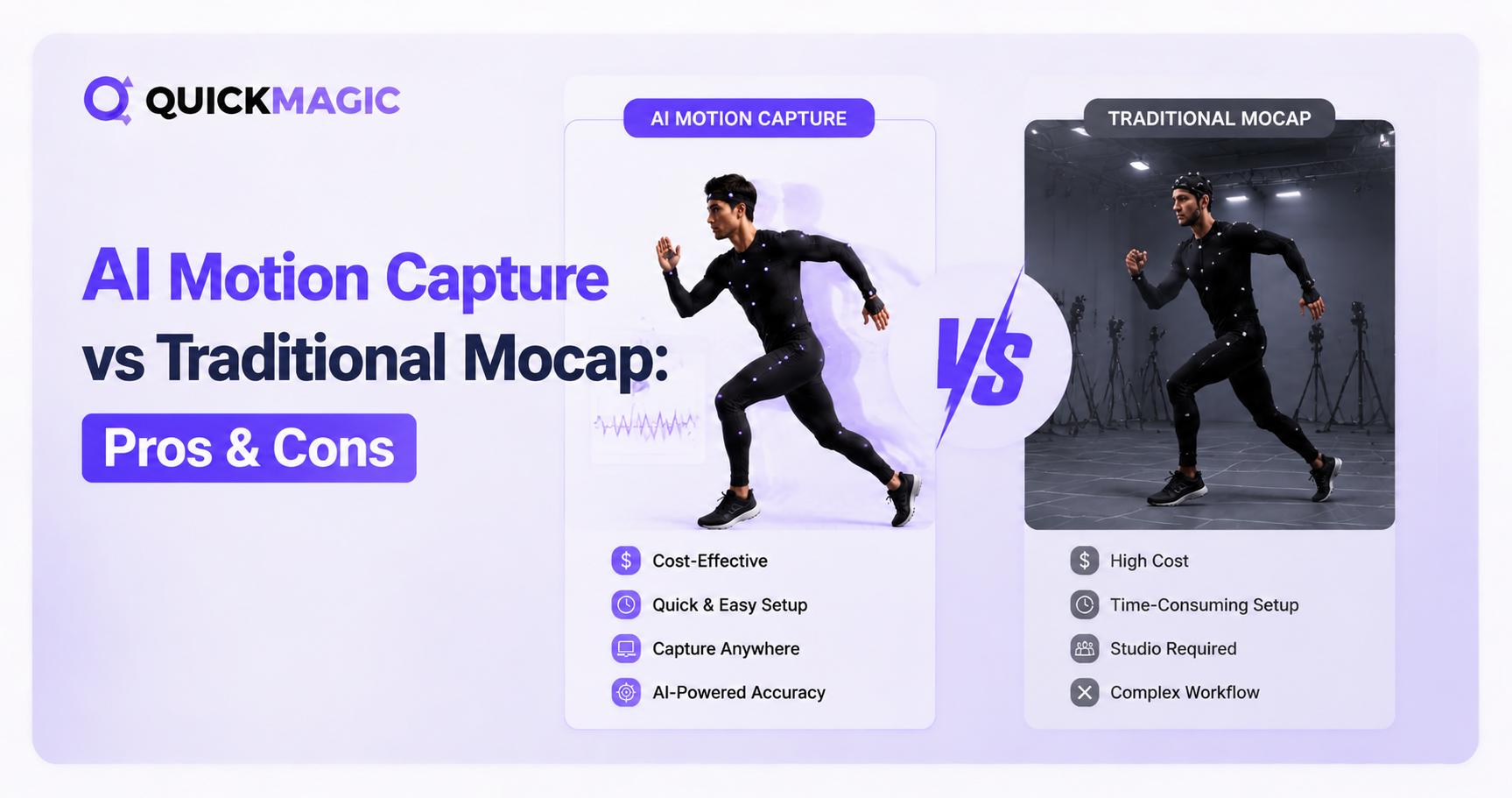
AI motion capture and traditional mocap represent two fundamentally different approaches to capturing human movement for 3D animation. AI mocap uses computer vision to extract motion data from standard video — no suits, markers, or studio rigs required — while traditional mocap relies on physical markers (optical) or inertial sensors (IMU suits) tracked by specialized hardware. The right choice depends on your budget, accuracy requirements, project scale, and production timeline.
What Is Traditional Motion Capture?
Traditional motion capture refers to technologies that require physical hardware attached to the performer's body or tracked by specialized camera systems. There are two main types:
Optical Marker-Based Mocap
Optical systems (e.g., Vicon, OptiTrack) use multiple high-speed infrared cameras to track reflective markers placed on a performer's body inside a calibrated capture volume. The cameras triangulate each marker's 3D position in real time, producing highly accurate skeletal motion data.
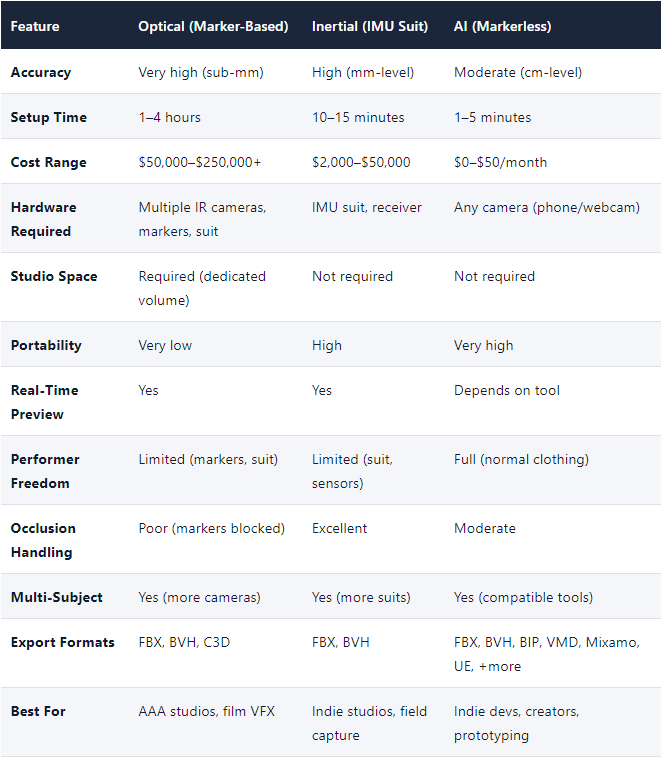
· Accuracy: Sub-millimeter positional precision, joint angle error < 1°
· Capture rate: 100–1,000+ Hz
· Setup: Requires dedicated studio space with controlled lighting
· Cost: $50,000–$250,000+ for professional systems
· Best for: AAA game studios, film VFX, biomechanics research
Inertial Measurement Unit (IMU) Mocap
Inertial systems (e.g., Xsens, Rokoko) use wearable sensors containing accelerometers, gyroscopes, and magnetometers to measure body movement. No external cameras are needed — the sensors directly measure joint angles on the body.
· Accuracy: Moderate to high; susceptible to magnetic interference and drift over time
· Capture rate: 60–500 Hz
· Setup: 10–15 minutes (suit + calibration)
· Cost: $2,000–$50,000 depending on quality
· Best for: Portable capture, indie studios, on-location shooting
What Is AI Motion Capture?
AI motion capture (also called markerless mocap or video-to-3D) uses deep learning and computer vision algorithms to extract 3D skeletal motion data from standard video footage. Instead of tracking physical markers, AI models identify body landmarks — joints, limbs, and facial features — directly from pixels.
Tools like QuickMagic analyze 2D video from any camera (including smartphones) and reconstruct 3D motion data that can be exported as FBX, BVH, BIP, VMD, and other industry-standard formats. The AI estimates joint positions by referencing trained datasets built from optical and inertial capture data — effectively using machine learning to predict 3D motion from 2D observation.
· Accuracy: Moderate; improving rapidly with newer models, but below optical systems
· Capture rate: 24–120 FPS output (multi-frame rate support)
· Setup: Minutes — upload video, process, export
· Cost: Subscription-based, typically $10–$50/month (or free tiers)
· Best for: Indie developers, content creators, prototyping, small studios
Head-to-Head Comparison: AI vs Traditional Mocap
The table below compares all three motion capture technologies across the factors that matter most for production decisions:
AI Motion Capture: Pros and Cons
Pros of AI Motion Capture
1. Dramatically Lower Cost. AI mocap eliminates the largest barrier to entry: hardware investment. Traditional optical systems cost $50,000–$250,000+, and even inertial suits run $2,000–$50,000. AI tools like QuickMagic operate on subscription models starting at free tiers, making professional-quality motion capture accessible to solo creators, indie studios, and students.
2. No Specialized Equipment Required. AI mocap works with any standard camera — a smartphone, webcam, or DSLR. No reflective markers, no sensor suits, no infrared camera arrays, no dedicated studio space with controlled lighting. You can capture motion in your living room, a park, or on a film set.
3. Minimal Setup Time. Traditional mocap sessions require 1–4 hours of setup (camera calibration, marker placement, system tuning). AI mocap requires only video upload and processing — typically 1–5 minutes from upload to export. This dramatically reduces the cost per capture session and enables rapid iteration.
4. Natural Performer Movement. Because performers wear their normal clothing with no markers or sensors, their movement is completely natural. This is particularly valuable for dance, martial arts, and emotional performances where restrictive suits would alter the motion being captured.
5. Broad Software Compatibility. Modern AI mocap tools support extensive export formats. QuickMagic alone offers 13+ formats including FBX, BVH, BIP, VMD, Mixamo, UE4/5.5/5.6, Character Creator & iClone, Roblox, and UniRobot — compatible with Blender, Maya, 3ds Max, Unreal Engine, Unity, MotionBuilder, and MikuMikuDance.
6. Multi-Frame Rate Output. AI tools like QuickMagic support variable frame rate output (24/30/60/120 FPS), letting you match your capture data to your target production pipeline without manual resampling — a feature that traditional systems typically require post-processing to achieve.
Cons of AI Motion Capture
1. Lower Accuracy Than Optical Systems. AI mocap estimates joint positions from 2D video using trained models. While accuracy has improved significantly, it cannot match the sub-millimeter precision of optical marker-based systems. For biomechanics research or AAA film VFX where pixel-perfect accuracy is critical, traditional optical systems remain the gold standard.
2. Sensitivity to Video Quality. AI mocap accuracy depends heavily on the quality of the source video. Poor lighting, motion blur, occlusion (body parts blocked from camera view), low resolution, and complex multi-subject scenes can all degrade capture quality. Traditional systems with physical markers are less affected by these factors.
3. Struggles with Complex Movements. Fast, complex movements — such as rapid spinning, martial arts combinations, or intricate hand gestures — can challenge AI models. Joint tracking may become unstable during extreme motion, requiring manual cleanup in post-production. Optical and inertial systems handle these scenarios more reliably.
4. Depth Estimation Challenges. Single-camera AI mocap must infer 3D depth from 2D video, which can produce errors in movements involving significant depth changes. Multi-camera AI setups mitigate this but add complexity. Traditional 3D systems capture true 3D data directly.
Traditional Mocap: Pros and Cons
Pros of Traditional Motion Capture
1. Superior Accuracy. Optical marker-based systems deliver sub-millimeter positional accuracy and joint angle errors below 1°. This precision is essential for high-end film VFX, biomechanics research, and any application where data fidelity directly impacts the final product quality.
2. Reliable Under Controlled Conditions. In a properly calibrated studio environment, traditional mocap systems produce consistent, repeatable results. They are not affected by lighting variations, clothing patterns, or camera angle limitations that can degrade AI mocap performance.
3. Real-Time Feedback. Professional optical and inertial systems provide real-time motion data streaming, enabling directors and animators to see captured performance applied to characters instantly. This is critical for large-scale productions where immediate feedback drives creative decisions.
4. Handles Complex Multi-Subject Scenes. Optical systems with sufficient cameras can track multiple performers simultaneously with high accuracy — essential for fight choreography, group interactions, and crowd scenes.
5. Established Production Pipelines. Traditional mocap has decades of industry adoption with mature, well-understood pipelines for data cleanup, retargeting, and integration.
Cons of Traditional Motion Capture
1. High Cost of Entry. A professional optical mocap studio requires $50,000–$250,000+ in hardware, plus dedicated studio space, specialized staff, and ongoing maintenance. Even inertial suits cost $2,000–$50,000.
2. Time-Consuming Setup. Optical systems require 1–4 hours of setup per session. Inertial suits are faster (10–15 minutes) but still require calibration and sensor placement.
3. Performer Restrictions. Mocap suits with markers or sensors can restrict natural movement. A single fallen marker can require retakes.
4. Studio Dependency. Optical systems require a dedicated, controlled studio space with specialized lighting and camera mounting.
5. Limited Portability. Traditional mocap systems are not easily transported. Optical camera arrays must be recalibrated after any movement.
Cost Breakdown: AI vs Traditional Mocap
The cost difference between AI and traditional motion capture is the single most significant factor for most creators. Here is a detailed breakdown:
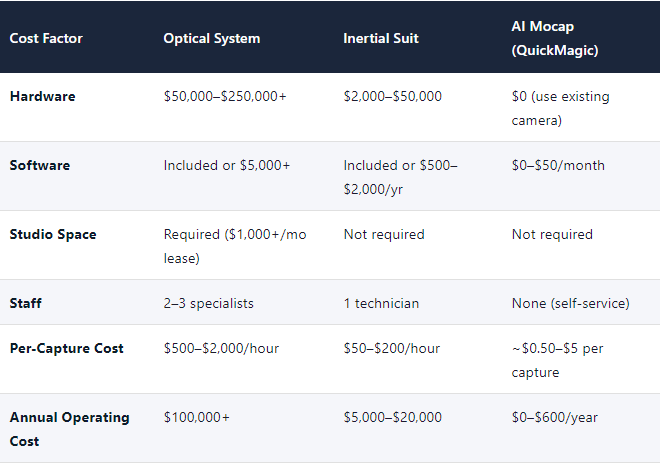
For a small studio producing 100 animation clips per year, the cost difference is staggering: traditional optical mocap could cost $150,000+ in the first year, while AI mocap might cost $300–$600. That is a 250x–500x cost reduction — the primary reason AI mocap has seen rapid adoption among indie developers and content creators.
Accuracy Compared: How Close Is AI to Traditional Mocap?
Accuracy is where traditional mocap maintains its strongest advantage. Here is how the three technologies compare across key accuracy metrics:
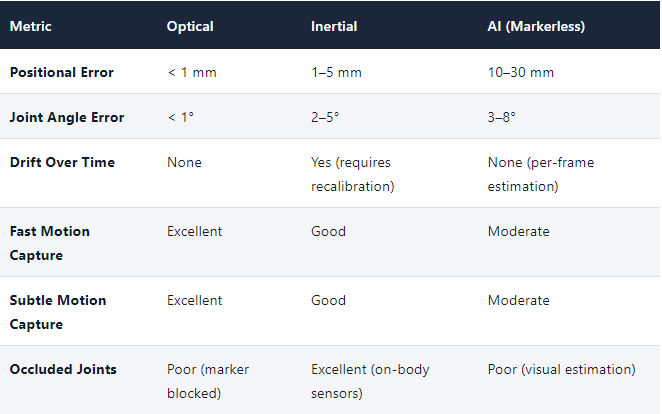
For the majority of animation use cases — game character locomotion, social animations, dance routines, content creation — AI mocap accuracy is more than sufficient. The difference becomes critical only for applications requiring scientific precision (biomechanics research, medical analysis) or ultra-high-end film VFX where every frame must be pixel-perfect.
A practical benchmark: AI mocap data typically requires 5–20% manual cleanup for standard movements, compared to 0–5% for optical systems. For indie and mid-tier productions, this cleanup time is far less costly than the hardware investment traditional mocap requires.
When to Choose AI Motion Capture
AI motion capture is the best choice when:
· Budget is limited: You are a solo developer, indie studio, student, or content creator working with a tight budget.
· Speed matters: You need motion data quickly for prototyping, iteration, or rapid content production.
· Portability is essential: You need to capture motion in multiple locations without transporting heavy equipment.
· Your project doesn't require scientific accuracy: Game character animations, VTuber content, social media videos, and MMD dance videos all work well with AI mocap's accuracy level.
· You need broad format compatibility: Tools like QuickMagic support 13+ export formats.
· You want to capture from existing footage: AI mocap can extract motion from video you already have.
· You need multi-frame rate output: QuickMagic's 24/30/60/120 FPS variable output matches any production pipeline.
Typical AI mocap users: Indie game developers, VTubers, MMD creators, social media animators, students, small animation studios, prototyping teams, and content creators.
When to Choose Traditional Mocap
Traditional motion capture is the best choice when:
· Maximum accuracy is non-negotiable: You are working on AAA game cinematics, film VFX, or scientific research where sub-millimeter precision directly impacts quality.
· You have a dedicated budget and studio: Your production can justify the $50,000+ investment in hardware, studio space, and specialized staff.
· You need real-time, highly reliable data: Live performance capture for virtual production, broadcast, or interactive installations.
· You capture complex multi-subject scenes: Fight choreography, crowd scenes, or performances with frequent occlusion.
· Your pipeline is already built around traditional mocap: Established studios with existing hardware, trained staff, and mature data pipelines.
· You need extremely high capture rates: Optical systems can capture at 1,000+ Hz for high-speed motion analysis.
Typical traditional mocap users: AAA game studios, film VFX houses, biomechanics labs, animation production companies, virtual production stages, and research institutions.
The Hybrid Approach: Combining AI and Traditional Mocap
Many modern studios are adopting a hybrid approach that leverages both technologies:
· Use AI mocap for prototyping and iteration: Quick, low-cost captures for testing animation concepts before committing to expensive studio sessions.
· Use traditional mocap for final hero shots: When the creative direction is locked, book a professional mocap studio for the highest-fidelity capture of key sequences.
· Use AI mocap for background and secondary characters: For crowd scenes, NPC animations, and secondary character movements where sub-millimeter accuracy isn't critical.
· Use traditional mocap for principal characters: Hero character performances, facial capture, and any shot that will be scrutinized on screen.
This approach can reduce overall mocap costs by 60–80% while maintaining the quality where it matters most. For indie studios, AI mocap alone may be sufficient for the entire project.
Ready to Try AI Motion Capture?
QuickMagic turns any video into clean 3D animation data — no suits, no markers, no studio required.
QuickMagic: AI Mocap Built for Production Pipelines
QuickMagic represents the current state of the art in AI motion capture, with features that address many of traditional mocap's limitations:
- 13+ export formats: FBX, BVH, BIP, C4D, VMD, Mixamo, UE4/5.5/5.6, Character Creator & iClone, Roblox, OnlyFace, UniRobot
- Multi-frame rate output: 24/30/60/120 FPS variable frame rate for any production pipeline
- Multi-subject tracking: Capture multiple performers from a single video
- Full-body, hand, and facial capture: Complete performance capture from one tool
- Text-to-motion generation: Describe an action in text and get a 3D animation draft
- Robot motion capture: Export motion data for Unitree G1, H1, and H1_2 formats for embodied AI
- Anti-penetration correction: Built-in physics optimization for cleaner animation data
- Static and global tracking modes: Choose the tracking mode that fits your capture scenario
Learn more about variable frame rate mocap with our multi-FPS tutorial.
Frequently Asked Questions
Is AI motion capture accurate enough for professional use?
Yes, for most professional animation use cases. AI mocap achieves joint angle accuracy of 3–8° and positional accuracy of 10–30 mm — sufficient for game character animation, VTuber content, social media videos, and indie film production. It is not yet suitable for applications requiring scientific-grade precision (biomechanics research) or AAA film VFX where sub-millimeter accuracy is expected. For most commercial animation projects, AI mocap data requires 5–20% manual cleanup, which is far more cost-effective than investing in traditional mocap hardware.
How much does AI motion capture cost compared to traditional mocap?
AI motion capture typically costs $0–$50 per month on a subscription basis, while traditional optical mocap systems cost $50,000–$250,000+ upfront plus ongoing studio and staff costs. Inertial suits fall in between at $2,000–$50,000. For a studio producing 100 animations per year, AI mocap can reduce total motion capture costs by 250x–500x compared to traditional optical systems.
Can AI motion capture replace traditional mocap entirely?
Not yet for high-end productions. AI mocap has largely replaced traditional systems for indie developers, content creators, and small studios where cost and speed outweigh the need for maximum accuracy. However, AAA game studios, film VFX houses, and research institutions still require the precision, reliability, and real-time capabilities of traditional optical or inertial systems. Many studios now use a hybrid approach — AI for prototyping and secondary content, traditional for hero shots.
What equipment do I need for AI motion capture?
You need only a camera (smartphone, webcam, or DSLR) and an internet connection to access an AI mocap platform like QuickMagic. No suits, markers, sensors, infrared cameras, or studio space are required. The AI processes your video in the cloud and returns clean 3D animation data in your preferred export format.
Which is better for game development: AI or traditional mocap?
For most indie and mid-tier game developers, AI mocap is the better choice due to its low cost, fast turnaround, and broad format compatibility. QuickMagic exports directly to Unreal Engine, Unity, and Mixamo formats. For AAA studios producing hundreds of animations with maximum fidelity requirements, traditional optical mocap remains the standard — often combined with AI mocap for prototyping and secondary character animations.
Does AI motion capture work with multiple performers?
Yes. Modern AI mocap tools like QuickMagic support multi-subject tracking from a single video, allowing you to capture interactions between multiple performers. However, accuracy may decrease when performers occlude each other. For complex multi-subject scenes with frequent occlusion, traditional optical systems with multiple cameras provide more reliable tracking.
What are the main limitations of AI motion capture?
The main limitations are: (1) lower accuracy than optical systems (cm-level vs sub-mm), (2) sensitivity to video quality (lighting, motion blur, occlusion), (3) difficulty with complex fast movements (rapid spinning, intricate hand gestures), and (4) depth estimation challenges from single-camera setups. These limitations are being addressed by ongoing AI research, and each new model generation improves performance.
Can I use AI motion capture for facial animation?
Yes. QuickMagic offers dedicated facial capture (OnlyFace) that extracts detailed facial expressions from video. This can be combined with body and hand capture for full performance capture. Traditional facial capture typically uses helmet-mounted cameras (e.g., for film VFX) which provide higher fidelity but at significantly greater cost and complexity.
How long does it take to capture motion with AI vs traditional mocap?
AI mocap takes 1–5 minutes from video upload to exportable animation data. Traditional optical mocap requires 1–4 hours of setup (camera calibration, marker placement, system tuning) plus the capture session itself. Inertial suits are faster at 10–15 minutes setup. For rapid prototyping and iteration, AI mocap's speed advantage is transformative — you can test multiple takes in the time it takes to set up a traditional session.
What export formats does AI motion capture support?
QuickMagic supports 13+ export formats: FBX, BVH, BIP, C4D, VMD, Mixamo, UE4, UE5.5, UE5.6, Character Creator & iClone, Roblox, OnlyFace, and UniRobot. This covers virtually every major 3D software and game engine, including Blender, Maya, 3ds Max, Unreal Engine, Unity, MotionBuilder, and MikuMikuDance. Traditional systems typically export FBX, BVH, and C3D — requiring additional conversion for some pipelines.