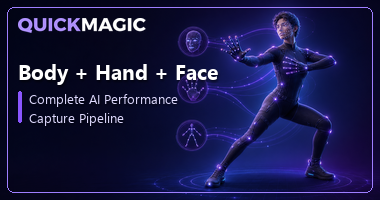
Body + Hand + Face: Complete AI Performance Capture Pipeline

How AI-powered markerless technology captures full-body motion, finger articulation, and facial expression simultaneously — turning a single video into production-ready 3D animation data.

Performance capture — the art of recording an actor's body, hands, and face in a single take — was once the exclusive domain of Hollywood studios with million-dollar optical rigs. Today, AI performance capture is rewriting the rules. A single video from a phone or webcam can now produce synchronized body hand face mocap data that drives 3D characters with full-body motion, finger-level articulation, and detailed facial expressions — all from one pipeline.

In this article, we break down how unified full body face tracking works under the hood, what makes it different from traditional fragmented workflows, and how tools like QuickMagic make it accessible to indie creators, game developers, VTubers, and animation studios alike.

What Is a Body + Hand + Face Performance Capture Pipeline?

A performance capture pipeline is a system that simultaneously records three layers of human motion from the same take:

  • Body tracking — Skeletal pose estimation covering torso, limbs, and full-body movement. Modern AI models detect 33+ 3D body landmarks including spine, shoulders, elbows, hips, knees, and feet.
  • Hand tracking — Finger-level articulation with 21 landmarks per hand, capturing every degree of freedom from palm rotation to fingertip curl. This is what separates performance capture from basic body mocap.
  • Face tracking — Dense facial mesh with up to 468 landmarks capturing eye gaze, eyebrow movement, lip sync, cheek deformation, and subtle micro-expressions.

When these three layers are captured together — rather than in separate passes — the result is a performance capture AI dataset where body language, hand gestures, and facial expression are naturally synchronized. A character's wave feels authentic because the arm motion, finger splay, and smile all come from the same real-time performance.

33
Body Landmarks
42
Hand Landmarks (2x21)
468
Face Mesh Points
543+
Total Tracked Points
Definition

Performance capture is the simultaneous recording of body skeleton motion, hand articulation, and facial expression from a single performance take. Unlike basic motion capture (body only), it preserves the full acting performance — the connection between what the body does, what the hands express, and what the face conveys.

The Problem with Fragmented Workflows

Before unified AI pipelines, capturing body, hands, and face meant running three entirely separate systems:

  • A body mocap suit (optical markers or IMU sensors) for skeletal motion.
  • A data glove or dedicated hand-tracking camera for finger data.
  • A head-mounted camera or facial capture rig for expressions.

Each system had its own software, its own calibration routine, and its own export format. Stitching the data together required hours of manual alignment in post-production — syncing timecodes, resolving conflicting skeletons, and fixing mismatched coordinate spaces. For small teams and indie creators, this was simply not viable.

The core problem was that these three tracking domains were treated as separate problems. Body pose estimation, hand landmark detection, and facial mesh fitting were handled by independent models with no shared understanding of the performer. The result: body mocap data that had no awareness of hand position, and facial animation that was disconnected from both.

Fragmented vs. Unified Performance Capture

AspectFragmented (Separate Tools)Unified AI Pipeline
Setup3+ systems calibrated separatelySingle video upload
HardwareMocap suit + gloves + HMCPhone or webcam
SyncManual timecode alignmentNaturally synchronized
Cost$5K–$100K+Free tier / $9.9/mo
OutputMultiple files, manual mergeSingle unified animation file
Best forAAA film/VFX with dedicated teamsIndie games, VTubers, MMD, previz, prototyping

How AI Performance Capture Works: The Unified Pipeline

A modern performance capture AI pipeline processes a single video through multiple coordinated stages. Here is how it works:

  1. Shared Feature Extraction A convolutional neural network processes the video frames and extracts shared visual features — edges, textures, motion flow, and depth cues. Rather than running three separate models from scratch, a unified backbone network generates a rich feature representation that all three tracking heads can draw from. This shared understanding means the body tracker "knows" where the hands are likely to be, and the face tracker benefits from head pose context.
  2. Body Pose Estimation The body tracking head predicts a 3D skeletal pose with 33+ landmarks covering the full body. This stage handles large-scale motion — walking, jumping, dancing — and provides the spatial context that guides the hand and face detectors.
  3. Hand Landmark Detection Using the wrist positions from the body skeleton as spatial anchors, the hand tracking stage detects 21 landmarks per hand. The model has been trained to handle self-occlusion, varied hand poses, and interaction with objects. Output includes fingertip position, joint angles, and palm orientation.
  4. Facial Mesh Reconstruction The face tracking stage fits a dense 3D mesh with 468+ points to the performer's face. This captures not just major expressions but subtle details — eyebrow raises, lip compression, eye gaze direction, and cheek deformation — that give digital characters believable emotional range.
  5. Synchronization, Retargeting & Export All three data streams are temporally aligned at the frame level (they come from the same video, so sync is inherent), retargeted to the user's character rig, and exported as a single unified animation file. Formats include FBX, BVH, BIP, VMD, Mixamo, and presets for Unreal Engine, Unity, Maya, Blender, iClone, and more.
Why Unified Matters

When body, hand, and face tracking share a common feature backbone, the pipeline gains contextual awareness. The body tracker's wrist position guides the hand detector's search region. The head pose from the body skeleton orients the face mesh. This mutual reinforcement improves accuracy across all three domains compared to running separate models in isolation.

What Affects Full Body Face Tracking Quality?

The accuracy of your performance capture depends on both the AI model and how you record your video. Here is what matters most:

Video Quality

1080p or higher resolution at 30+ FPS is recommended. Higher resolution gives the AI more pixels per body part — critical for distinguishing individual fingers and subtle facial expressions. Fast frame rates (60 FPS) capture dynamic motion with less blur.

Lighting

Even, soft lighting is essential. The AI needs to see the full face clearly for expression capture and distinguish fingers from each other and from the background. Avoid harsh shadows, backlighting, and very low-light conditions.

Camera Framing

Position the camera so the performer's full body, hands, and face are visible throughout the take. A mid-shot that cuts off the legs will limit body tracking to upper-body mode. Hands that drift out of frame will lose finger data for those moments.

Performer Clothing and Environment

Wear form-fitting clothing in colors that contrast with the background. Loose, baggy clothing obscures body silhouette and reduces pose accuracy. A clean, uncluttered background helps the AI separate the performer from the environment.

Occlusion Management

Avoid prolonged self-occlusion — hands behind the back, face covered by hair or props, body blocked by furniture. Brief occlusion is handled by temporal interpolation, but extended hidden segments force the AI to guess, reducing quality.

How QuickMagic Delivers Body + Hand + Face Mocap

QuickMagic is built around making unified performance capture as simple as uploading a video:

  1. Record a performance with any camera — a phone, webcam, DSLR, or mirrorless. Make sure body, hands, and face are visible.
  2. Upload the footage to QuickMagic. Select body, hand, and facial capture in a single workflow.
  3. Process — QuickMagic's AI estimates full-body motion, hand articulation, and facial expression frame by frame.
  4. Preview the result in the built-in viewer to check all three layers — body movement, finger detail, and facial animation.
  5. Export in your preferred format (FBX, BVH, BIP, VMD, Mixamo, UE5, etc.) and drop the unified animation directly into your 3D pipeline.

Key capabilities that matter for body hand face mocap:

  • Simultaneous capture — Body, hands, and face from a single video upload. No need to run separate passes.
  • Multi-subject support — Track multiple performers in one shot, each with body, hand, and face data.
  • Flexible frame rates — Export at 24, 30, 60, or 120 FPS to match your project.
  • Anti-penetration — Built-in collision correction prevents fingers from clipping through palms and body.
  • 13+ export formats — FBX, BVH, BIP, C4D, VMD, Mixamo, Unreal Engine, Unity, Maya, Blender, iClone, MMD, Roblox, Cascadeur, and more.
  • Static and moving camera — Works with tripod shots and handheld/moving camera footage.
Who Uses Unified Performance Capture?

Game developers animating cutscenes and character interactions, VTubers driving expressive avatars with natural body language, indie filmmakers prototyping performances before studio shoots, MMD creators producing synchronized dance videos, and studios using AI capture for previs and layout before committing to full optical sessions.

Frequently Asked Questions

What is AI performance capture with body, hand, and face tracking?

AI performance capture is a markerless technology that simultaneously captures full-body motion, hand articulation, and facial expressions from a single video using deep learning models. Instead of running three separate tracking systems, a unified AI pipeline extracts all motion data at once and exports it as editable 3D animation.

How does markerless performance capture AI work?

The AI pipeline processes video through three coordinated stages: a body pose estimator detects 3D skeletal motion, a hand tracker identifies 21 landmarks per hand for finger-level detail, and a facial mesh model captures 468+ facial landmarks. These outputs are synchronized and exported as industry-standard 3D animation data.

Can I do full body face tracking from a single video?

Yes. Modern AI performance capture tools like QuickMagic extract full-body motion, finger articulation, and detailed facial expressions — all from a single video recorded with a phone or webcam. No mocap suits, reflective markers, depth sensors, or multi-camera studios are needed.

What is the difference between motion capture and performance capture?

Motion capture traditionally records body movement only. Performance capture adds hand and facial tracking to the same take, capturing an actor's complete physical performance — body, hands, and face — simultaneously. AI has made performance capture accessible without expensive studio hardware.

What formats does QuickMagic performance capture export to?

QuickMagic exports unified body, hand, and face motion data in 13+ formats including FBX, BVH, BIP, VMD, Mixamo, Unreal Engine presets, Unity, and Maya-compatible files. These integrate directly with Blender, iClone, MikuMikuDance, Roblox, Cascadeur, and other 3D animation tools.

Ready to Capture Complete Performances?

Upload a video to QuickMagic and get body, hand, and face mocap data in one unified pipeline. No suit, no markers, no studio — just AI-powered performance capture from any camera.

Try QuickMagic Free