V1.0 vs V2.0 Beta · Dynamic Motion · Physics Optimization 2.0

QuickMagic Animation Base Model V2.0: Complete User Guide

Choose the right base model for everyday movement or complex dynamics, record better footage for climbing, jumps, falls, rolling and interaction, understand the limits of occlusion prediction, tune Physics Optimization 2.0 and validate the exported motion on the real production character.

Published February 4, 2026 · Updated July 15, 2026 · QuickMagic Editorial Team

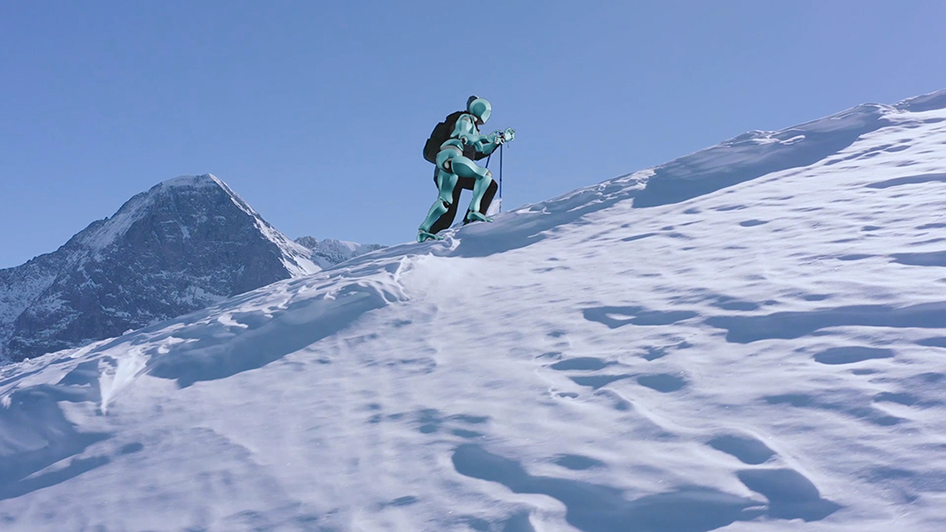
QuickMagic Animation Base Model V2.0 climbing motion capture example
The original QuickMagic V2.0 cover is compressed and embedded in this HTML file.
Direct answer: Use Animation Base Model V1.0 for flat-ground walking, ordinary dance, simple acting and clearly visible body motion. Use Animation Base Model V2.0 (Beta) for climbing, stairs, slopes, crawling, rolling, jumps, airborne action, sports, falls, rapid center-of-gravity changes and brief partial occlusion. Keep the full action visible whenever possible, then apply Physics Optimization 2.0 and validate predicted joints, root trajectory and contacts after retargeting.
Beta limitation: V2.0's motion prediction can fill some short occluded or out-of-frame intervals, but invisible motion is not directly observed. Do not promise exact recovery when a hand, foot or body region remains hidden for a long or ambiguous section.

Official V2.0 facts

StatusV2.0 is currently labeled Beta
Core strengthComplex dynamic pose and trajectory reconstruction
TerrainStairs, slopes, climbing, crawling and rolling
DynamicsJumping, airborne movement, sports and falls
PredictionLimited inference for occluded/out-of-frame limbs
PhysicsV1.0 and V2.0 both integrate Physics Optimization 2.0
QuickMagic Animation Base Model V1.0 versus V2.0 Beta model selection guide
V2.0 is not automatically the best choice for every clip. Use the simplest model that reliably reconstructs the action.

Official V2.0 demonstration clips

The two clips below were converted from the original article's animated GIF examples into compact MP4 files and embedded directly. They work without external image hosting.

Complex terrain and climbing trajectory

Demonstrates V2.0's intended use for slope movement, climbing mechanics, force transfer and non-flat-ground trajectory reconstruction.

Open original GIF

Seated interaction and partial occlusion

Demonstrates body interaction around an object, seated posture and limbs that are partly obscured by pose, clothing or the environment.

Open original GIF

The embedded MP4 clips are self-contained. Autoplay is intentionally not required; use the player controls. The original GIF links are provided as a fallback.

Independent QuickMagic V2 Beta test

QuickMagic V2 Test — Acting Performance from a Single Video

A third-party acting-performance test provides a useful complement to QuickMagic's official dynamic-action demos.

Open video on YouTube

YouTube playback requires network access. If the iframe is blocked, use the red direct link.

What Animation Base Model V2.0 changes

V1.0 is QuickMagic's first-generation general motion model. The official guide positions it for everyday and dance movement, flat-ground action, clear visibility and modest changes in balance.

V2.0 builds on that base for actions where pose and trajectory are harder to reconstruct: complex terrain, force-driven movement, rapid changes in the center of gravity, airborne phases, falls and partial visibility. QuickMagic states that it provides more refined pose reconstruction and more accurate trajectory tracking for those scenarios.

CapabilityV1.0V2.0 Beta
Everyday walking, turning and gesturesRecommendedSupported, but may be unnecessary
Dance and standard actingRecommendedUse when dynamics/occlusion justify it
Stairs, slopes and climbingLimited/generalRecommended
Jumps and airborne actionMore difficultRecommended
Rolling, crawling and fallsMore difficultRecommended
Brief partial occlusionPrefer clear visibilitySome predictive continuity
Production statusEstablished base modelBeta; validate carefully

Select the model in the QuickMagic generation panel

QuickMagic Motion Generating interface showing Animation Base Model V1.0 and V2.0 Beta, frame rate, Physical Optimization and in-place motion
Original QuickMagic interface screenshot. Model selection sits alongside capture scope, reference pose, export preset, frame rate, Physics Optimization and in-place motion.
  1. Open the Video-to-Mocap motion-generation settings.
  2. Choose Animation Base Model V1.0 or V2.0 Beta.
  3. Select Full Body, Upper Body or Hand options required by the source.
  4. Choose Original Pose, T-Pose or A-Pose for the destination workflow.
  5. Select the target export preset and frame rate.
  6. Choose Physics Optimization and its iteration multiplier.
  7. Set In-place Motion only when the final asset should not preserve global travel.
Model availability and the exact interface can vary by account, product update and selected workflow. Use the active generation panel as the source of truth.

Understand the limits of V2.0 motion prediction

Diagram explaining useful short occlusion inference versus unrecoverable long ambiguous occlusion
Prediction can preserve plausible continuity, but it does not reveal the exact movement that happened behind an object or outside the camera frame.

Good prediction conditions

  • The occlusion is brief.
  • The limb is visible immediately before and after the gap.
  • The movement follows a common biomechanical trajectory.
  • The torso, hips and opposite limb remain trackable.
  • The video has low blur and stable timing.

High-risk prediction conditions

  • A body region is hidden for several seconds.
  • Multiple people or objects overlap the same joints.
  • The performer reverses direction behind an obstacle.
  • Hands manipulate a small prop that cannot be seen.
  • The subject leaves the frame during a jump, fall or roll.

1Record complex movement for V2.0

  • Use wider framing than for ordinary walking or dancing.
  • Leave margin above, below and beside the action trajectory.
  • Keep the terrain, stairs, wall, chair or other contact surface visible.
  • Use bright lighting and a fast shutter for jumps, falls and sports.
  • Prefer a stable camera unless the chosen QuickMagic mode supports camera movement.
  • Avoid loose clothing that hides knees, elbows and hip orientation.
  • Record a second angle for critical interaction or long occlusion.
  • Begin and end with stable visible poses when practical.
Do not deliberately crop limbs because V2.0 can predict them. Prediction is a fallback for unavoidable gaps, not a replacement for good capture.

2Configure the full motion-generation workflow

QuickMagic V2.0 production workflow from action classification and recording to model selection, optimization and target validation
Model selection is one decision inside a larger pipeline. FPS, skeleton preset, reference pose and root behavior can still determine whether the output works.

Reference pose

Match the T-pose or A-pose expected by the target retargeter. Incorrect pose alignment can cause shoulder, wrist and hip errors that are unrelated to V1/V2 model quality.

Frame rate

Use 24 FPS for a 24p cinematic pipeline, 30 FPS as a general default, 60 FPS for fast action and dense editing, and 120 FPS only when the source and retiming workflow contain genuine high-speed detail.

Traveling vs in-place

Preserve traveling root motion for climbing through space, long falls or cinematic action. Use in-place only when the destination navigation or gameplay system needs the character to remain near the origin.

Target preset

Choose Unreal, Mixamo, C4D, CC&iClone, Roblox or another matching preset when available. The base model reconstructs motion; the preset controls how that motion is packaged for the target skeleton.

V2.0 and Physics Optimization 2.0 solve different problems

Animation Base Model V2.0 estimates complex body pose and trajectory. Physics Optimization 2.0 adjusts the generated movement toward smoother and more physically stable behavior. QuickMagic states that both V1.0 and V2.0 integrate with Physics Optimization 2.0.

Iteration multiplierQuickMagic's stated tendencyUse when
1x–2xMore motion amplitude and source detailSports, impacts, expressive action and forceful movement
3x–5xBalanced detail and smoothnessGeneral complex movement after initial validation
10xSmoother and softer, with reduced amplitudeVisible jitter or harsh transitions where energy loss is acceptable
Higher is not automatically better. Over-smoothing can reduce jump height, impact, body weight and the expressive timing that made V2.0 necessary.

Run a controlled V1.0 vs V2.0 comparison

  1. Trim a representative 5–10 second section.
  2. Keep capture scope, reference pose, FPS, target format and root setting identical.
  3. Generate one result with V1.0 and one with V2.0 Beta.
  4. Use the same Physics Optimization setting for the first comparison.
  5. Compare root trajectory, center of gravity, foot contacts, joint limits and occluded limbs.
  6. Retarget both outputs to the actual production rig.
  7. Select the model that needs less correction—not merely the smoother preview.

Score the comparison

CriterionQuestions
TrajectoryDoes the character travel, climb, fall or roll along the correct path?
BalanceIs the center of gravity plausible during takeoff, landing and support?
ContactsDo feet, hands and body surfaces contact terrain at the right time?
OcclusionAre predicted limbs plausible before, during and after the hidden interval?
EnergyAre speed, amplitude and impacts preserved?
Cleanup costWhich result requires fewer keyframe or IK corrections on the target rig?

Recommended model by scenario

ScenarioStarting modelCapture priorityLikely cleanup
Walking, turning, idle actingV1.0Full feet and clean ground planeFoot contact and root drift
Dance with clear visibilityV1.0Low blur and wide framingHands, feet and curve smoothing
Running on treadmillV2.0 testShow belt, feet and stable torsoIn-place/root logic and foot timing
Climbing stairs or wallV2.0Show hands, feet and contact surfacesIK locks and terrain alignment
Jump or airborne sports actionV2.0Fast shutter and full trajectory marginTakeoff/landing and center of gravity
Fall or death animationV2.0Keep the body visible through impactGround penetration and final rest pose
Crawl, roll or breakdance floorworkV2.0Visible floor, head and limb contactsBody-ground contact and occlusion
Seated furniture interactionV2.0 testShow chair/table and avoid deep occlusionHands, pelvis and collision cleanup
Swimming or cyclingV2.0 testClear body silhouette and equipmentProp/equipment constraints and cyclic timing

Retarget and clean the V2.0 result

  1. Import the QuickMagic source motion with the correct frame rate and axis.
  2. Match source and target reference poses.
  3. Retarget to the production skeleton.
  4. Check root and pelvis trajectory before locking the feet.
  5. Add IK contacts for stairs, walls, chairs, props or the ground.
  6. Correct only verified prediction errors in hidden limbs.
  7. Use animation layers for impacts, holds and interaction details.
  8. Bake and export only after the target character passes validation.
A physically plausible source can still fail on a target with different limb lengths or proportions. Judge V2.0 after retargeting, not only on QuickMagic's preview character.

Common V2.0 problems

ProblemLikely causeRecommended fix
Ordinary walking is less stable than expectedV2.0 was used when V1.0 was sufficientGenerate a V1.0 comparison and choose the lower-cleanup result.
Predicted hand moves incorrectly behind a propLong or ambiguous occlusionUse a second angle, 2D correction or manual hand keyframes.
Jump loses height or impactPhysics iteration multiplier is too highReduce the multiplier and restore the intended amplitude.
Feet float on stairs or slopesTerrain is not part of the exported skeleton motionAlign the target environment and add foot IK/contact correction.
Character penetrates the ground during a fallBody-ground contact is complex and target proportions differUse animation layers, IK/contact constraints or physics cleanup in the DCC.
Motion drifts during a long takeCumulative trajectory errorSplit the performance into shorter segments and blend after cleanup.
V2.0 option is not visibleInterface/account/workflow availability differsCheck the active generation mode and current QuickMagic product interface.
Preview looks good but target rig twistsReference pose or skeleton mapping mismatchFix retarget pose and mapping before changing the source animation.

Production checklist

  • The action genuinely benefits from V2.0's dynamic-motion focus.
  • The full trajectory and contact surfaces are visible.
  • Motion blur is low enough to read fast limbs.
  • Occlusions are brief or a second angle is available.
  • Reference pose, FPS, target preset and root behavior are recorded.
  • Physics iteration is chosen by visible need, not maximum value.
  • A short V1/V2 comparison has been reviewed.
  • Predicted joints are checked around hidden intervals.
  • The result is validated on the actual target character.
  • Contacts, terrain interaction and final export are tested after baking.

Frequently asked questions

What is QuickMagic Animation Base Model V2.0?

It is QuickMagic's Beta base model for complex high-dynamic video-to-mocap, including climbing, slopes, stairs, crawling, rolling, jumps, airborne action, sports, falls and partial occlusion.

When should I use V1.0?

Use V1.0 for everyday flat-ground actions, dance, ordinary acting and clearly visible movement with modest balance changes.

Can V2.0 reconstruct limbs outside the frame?

It can infer some brief missing movement, but long or ambiguous invisible motion cannot be considered exact. Reshoot or correct critical hidden actions.

Does V2.0 replace Physics Optimization 2.0?

No. V2.0 reconstructs dynamic motion, while Physics Optimization changes smoothness, amplitude and physical contact behavior.

Which physics iteration multiplier should I use?

Start at 1x or 2x to preserve energy. Increase gradually when visible jitter or transition artifacts justify smoother motion.

Is V2.0 better for every clip?

No. It remains Beta and is targeted at complex dynamics. Compare V1.0 and V2.0 on a short representative segment when the best model is unclear.

How should I film climbing or falling?

Use wide framing, visible terrain and contact surfaces, bright lighting, low blur and a second angle for critical occlusions.

Does V2.0 eliminate cleanup?

No. Root trajectory, target proportions, foot and hand contacts, terrain collision and predicted hidden limbs still require production validation.

Related QuickMagic guides

Test V1.0 and V2.0 on the hardest ten seconds

Compare the same dynamic segment with identical output settings, retarget both files to the real character and choose the result with the lower correction cost.

Open QuickMagic Video-to-Mocap →

Official references and media sources