





V1.0 vs V2.0 Beta · Movimento dinamico · Ottimizzazione fisica 2.0
QuickMagic Animation Base Model V2.0: Guida completa per l'utente
Scegli il modello base giusto per movimenti quotidiani o dinamiche complesse, registra filmati migliori per arrampicata, salti, cadute, rotolamenti e interazioni, comprendi i limiti della previsione di occlusione, ottimizza Physics Optimization 2.0 e convalida il movimento esportato sul personaggio di produzione reale.

Fatti ufficiali su V2.0

Clip dimostrative ufficiali di V2.0
Le due clip seguenti sono state convertite dagli esempi GIF animati dell'articolo originale in file MP4 compatti e incorporate direttamente. Funzionano senza hosting di immagini esterno.
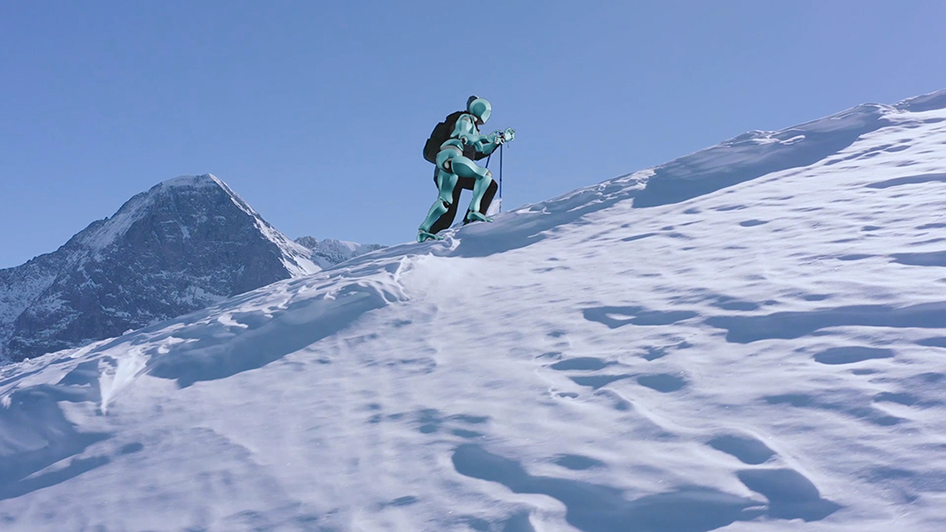
Terreno complesso e traiettoria di arrampicata
Dimostra l'uso previsto di V2.0 per movimento su pendii, meccaniche di arrampicata, trasferimento di forza e ricostruzione della traiettoria su terreno non pianeggiante.
Apri GIF originaleInterazione seduta e occlusione parziale
Dimostra l'interazione del corpo attorno a un oggetto, la postura seduta e gli arti parzialmente oscurati dalla posa, dagli indumenti o dall'ambiente.
Apri GIF originaleTest indipendente di QuickMagic V2 Beta
QuickMagic V2 Test — Performance di recitazione da un singolo video
Un test di performance di recitazione di terze parti fornisce un utile complemento alle demo ufficiali di azioni dinamiche di QuickMagic.
Apri video su YouTubeCosa cambia con Animation Base Model V2.0
V1.0 è il modello di movimento generale di prima generazione di QuickMagic. La guida ufficiale lo posiziona per movimenti quotidiani e di danza, azioni su terreno pianeggiante, visibilità chiara e cambiamenti modesti nell'equilibrio.
V2.0 si basa su questa base per azioni in cui la posa e la traiettoria sono più difficili da ricostruire: terreni complessi, movimenti guidati dalla forza, rapidi cambi del baricentro, fasi aeree, cadute e visibilità parziale. QuickMagic afferma che fornisce una ricostruzione della posa più raffinata e un tracciamento della traiettoria più accurato per questi scenari.
| Capacità | V1.0 | V2.0 Beta |
|---|---|---|
| Camminata quotidiana, svolte e gesti | Consigliato | Supportato, ma potrebbe non essere necessario |
| Danza e recitazione standard | Consigliato | Usa quando dinamiche/occlusione lo giustificano |
| Scale, pendenze e arrampicata | Limitato/generale | Consigliato |
| Salti e azione aerea | Più difficile | Consigliato |
| Rotolamento, gattonamento e cadute | Più difficile | Consigliato |
| Breve occlusione parziale | Preferisci visibilità chiara | Una certa continuità predittiva |
| Stato di produzione | Modello base consolidato | Beta; convalidare attentamente |
Seleziona il modello nel pannello di generazione di QuickMagic

- Apri le impostazioni di generazione del movimento Video-to-Mocap.
- Scegli Animation Base Model V1.0 o V2.0 Beta.
- Seleziona le opzioni Full Body, Upper Body o Hand richieste dalla sorgente.
- Scegli Original Pose, T-Pose o A-Pose per il flusso di lavoro di destinazione.
- Seleziona il preset di esportazione e il frame rate target.
- Scegli Physics Optimization e il suo moltiplicatore di iterazione.
- Imposta In-place Motion solo quando l'asset finale non deve preservare lo spostamento globale.
Comprendi i limiti della previsione del movimento di V2.0

Buone condizioni per la previsione
- L'occlusione è breve.
- L'arto è visibile immediatamente prima e dopo l'intervallo.
- Il movimento segue una traiettoria biomeccanica comune.
- Il busto, i fianchi e l'arto opposto rimangono tracciabili.
- Il video ha bassa sfocatura e temporizzazione stabile.
Condizioni di previsione ad alto rischio
- Una regione del corpo è nascosta per diversi secondi.
- Più persone o oggetti si sovrappongono alle stesse giunture.
- L'esecutore inverte la direzione dietro un ostacolo.
- Le mani manipolano un piccolo oggetto di scena che non può essere visto.
- Il soggetto esce dall'inquadratura durante un salto, una caduta o un rotolamento.
1Registrare movimenti complessi per V2.0
- Usa un'inquadratura più ampia rispetto a camminate o danze ordinarie.
- Lascia margine sopra, sotto e ai lati della traiettoria dell'azione.
- Mantieni visibili il terreno, le scale, il muro, la sedia o altre superfici di contatto.
- Usa illuminazione brillante e otturatore veloce per salti, cadute e sport.
- Preferisci una telecamera stabile a meno che la modalità QuickMagic scelta non supporti il movimento della telecamera.
- Evita abiti larghi che nascondono ginocchia, gomiti e orientamento dei fianchi.
- Registra una seconda angolazione per interazioni critiche o occlusioni lunghe.
- Inizia e termina con pose stabili e visibili quando possibile.
2Configurare l'intero flusso di lavoro di generazione del movimento

Posa di riferimento
Abbina la T-pose o A-pose prevista dal retargeter di destinazione. Un allineamento errato della posa può causare errori alle spalle, ai polsi e ai fianchi che non sono correlati alla qualità del modello V1/V2.
Frame rate
Usa 24 FPS per una pipeline cinematografica 24p, 30 FPS come impostazione predefinita generale, 60 FPS per azioni veloci e montaggio denso, e 120 FPS solo quando la sorgente e il flusso di lavoro di rimappatura contengono dettagli ad alta velocità genuini.
In movimento vs. sul posto
Preserva il movimento del root in movimento per arrampicarsi nello spazio, cadute lunghe o azioni cinematografiche. Usa sul posto solo quando il sistema di navigazione o gameplay di destinazione richiede che il personaggio rimanga vicino all'origine.
Preset di destinazione
Scegli Unreal, Mixamo, C4D, CC&iClone, Roblox o un altro preset corrispondente quando disponibile. Il modello base ricostruisce il movimento; il preset controlla come quel movimento viene impacchettato per lo scheletro di destinazione.
V2.0 e Physics Optimization 2.0 risolvono problemi diversi
Animation Base Model V2.0 stima la posa complessa del corpo e la traiettoria. Physics Optimization 2.0 regola il movimento generato verso un comportamento più fluido e fisicamente stabile. QuickMagic afferma che sia V1.0 che V2.0 si integrano con Physics Optimization 2.0.
| Moltiplicatore di iterazione | Tendenza dichiarata da QuickMagic | Usa quando |
|---|---|---|
| 1x–2x | Più ampiezza del movimento e dettaglio della sorgente | Sport, impatti, azioni espressive e movimenti energici |
| 3x–5x | Equilibrio tra dettaglio e morbidezza | Movimenti complessi generali dopo la convalida iniziale |
| 10x | Più fluido e morbido, con ampiezza ridotta | Scatti visibili o transizioni brusche dove la perdita di energia è accettabile |
Eseguire un confronto controllato V1.0 vs V2.0
- Taglia una sezione rappresentativa di 5-10 secondi.
- Mantieni identici ambito di acquisizione, posa di riferimento, FPS, formato di destinazione e impostazione del root.
- Genera un risultato con V1.0 e uno con V2.0 Beta.
- Usa la stessa impostazione di Physics Optimization per il primo confronto.
- Confronta traiettoria del root, baricentro, contatti del piede, limiti delle giunture e arti occlusi.
- Esegui il retargeting di entrambi gli output sul rig di produzione reale.
- Seleziona il modello che richiede meno correzioni, non solo l'anteprima più fluida.
Valuta il confronto
| Criterio | Domande |
|---|---|
| Traiettoria | Il personaggio viaggia, si arrampica, cade o rotola lungo il percorso corretto? |
| Equilibrio | Il baricentro è plausibile durante decollo, atterraggio e supporto? |
| Contatti | Piedi, mani e superfici del corpo entrano in contatto con il terreno al momento giusto? |
| Occlusione | Gli arti previsti sono plausibili prima, durante e dopo l'intervallo nascosto? |
| Energia | Velocità, ampiezza e impatti sono preservati? |
| Costo di pulizia | Quale risultato richiede meno correzioni di keyframe o IK sul rig di destinazione? |
Modello consigliato per scenario
| Scenario | Modello iniziale | Priorità di acquisizione | Pulizia probabile |
|---|---|---|---|
| Camminata, svolte, recitazione inattiva | V1.0 | Piedi interi e piano terra pulito | Contatto del piede e deriva del root |
| Danza con visibilità chiara | V1.0 | Bassa sfocatura e inquadratura ampia | Mani, piedi e levigatura della curva |
| Corsa su tapis roulant | Test V2.0 | Mostra nastro, piedi e busto stabile | Logica sul posto/root e temporizzazione del piede |
| Salire scale o muri | V2.0 | Mostra mani, piedi e superfici di contatto | Blocchi IK e allineamento del terreno |
| Salto o azione sportiva aerea | V2.0 | Otturatore veloce e margine completo della traiettoria | Decollo/atterraggio e baricentro |
| Animazione di caduta o morte | V2.0 | Mantieni il corpo visibile attraverso l'impatto | Penet |


