


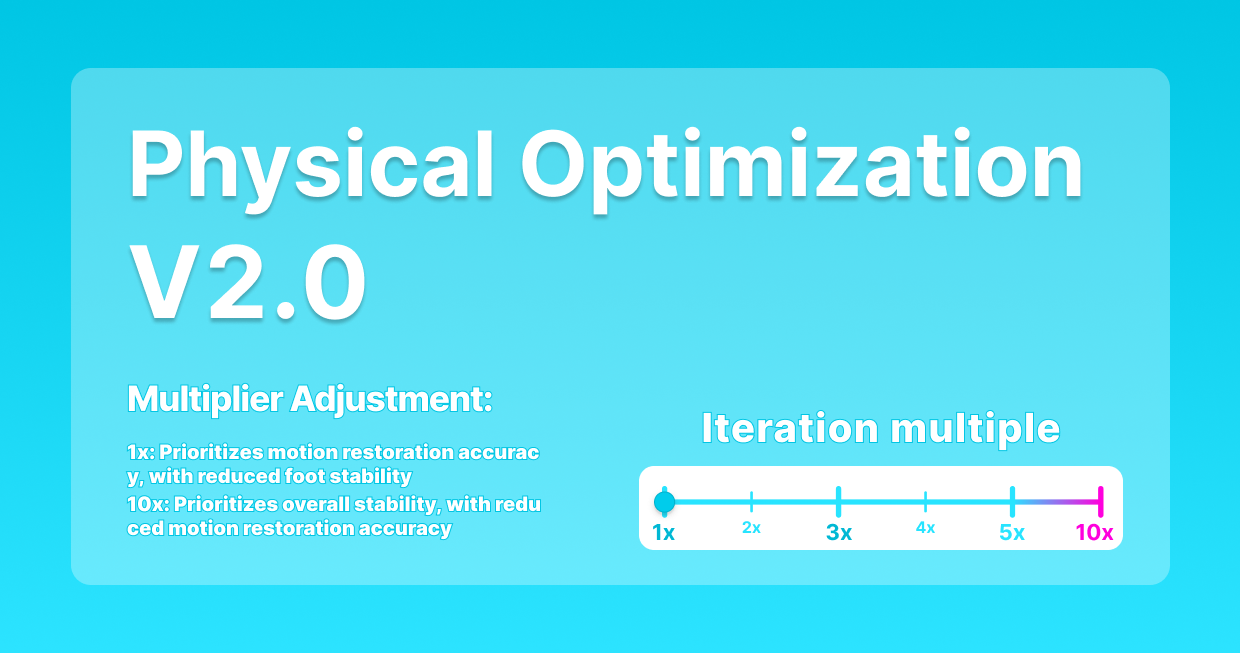
1×–10× Iterations · Fidelity · Stability · Contact Cleanup
MoCap Physics Cleanup: Fix Animation Artifacts with QuickMagic Physics Optimization 2.0
Learn what each iteration multiplier changes, how to preserve motion energy, when higher stabilization helps, why foot sliding can return after retargeting, and how to finish QuickMagic motion in Cascadeur, Blender, Maya or Unreal Engine.
Official parameter behavior
Original QuickMagic comparison examples
The source article's four animated GIFs have been converted into compact MP4 files and embedded directly. They can play from the downloaded HTML without relying on the image CDN.
V1.0 vs Physics Optimization 2.0 at 1×
A dynamic movement comparison focused on preserving range and body mechanics at the lowest iteration.
Open original GIFV1.0 vs 10× stabilization
A standing/walking example emphasizing foot stability and the softer result produced by high iteration.
Open original GIFBefore and after optimization: energetic movement
A source comparison showing how physical cleanup changes a dynamic animation.
Open original GIFBefore and after optimization: walking stability
A walking comparison useful for reviewing floating, skating and pelvis stability.
Open original GIFDownstream cleanup tutorials
QuickMagicAI MoCap Clean-Up in Cascadeur
Shows a practical post-QuickMagic cleanup workflow in Cascadeur.
Open on YouTubeCascadeur + QuickMagic: Video MoCap Cleanup and Editing
Demonstrates motion cleaning, pose editing and physics-assisted finishing.
Open on YouTubeDiagnose the artifact before changing the multiplier
Use the QuickMagic preview as the boundary test
- If the preview skeleton is already wrong, fix source tracking, model choice or Physics Optimization.
- If the preview is clean but the target rig is wrong, fix retargeting.
- If target bones are correct but the mesh intersects, fix weights, collision or corrective shapes.
- If the character interacts with terrain or props, use target-scene IK and contact tools.
1Choose the multiplier from the action, not from “maximum quality”
| Multiplier | Starting use | Advantages | Risks |
|---|---|---|---|
| 1× | High kicks, jumps, sports, impacts and expressive action | Maximum fidelity and amplitude | More visible instability can remain |
| 2× | Dynamic motion needing light cleanup | Small stability gain with limited energy loss | May not remove larger artifacts |
| 3×–4× | General cleanup and transition refinement | Balanced smoothness and range | Can soften fast accents |
| 5× | Noticeable jitter or uncomfortable movement | Stronger smoothing and stability | Reduced amplitude and body weight |
| 10× | Strong floating, penetration or skating in the source | Maximum available stabilization | Can flatten jumps, impacts, strides and style |
2Run a controlled A/B test
- Trim a representative 5–10 second interval containing the artifact.
- Keep base model, capture scope, reference pose, FPS, export preset and root behavior unchanged.
- Generate 1×, one middle value and 10×.
- Compare root trajectory, foot speed, hip rotation, jump height, limb range and impacts.
- Retarget the finalists to the actual character.
- Choose the result that needs the least total correction—not the smoothest source preview.
Useful scorecard
| Criterion | Question |
|---|---|
| Fidelity | Does the motion preserve the performer's amplitude, timing and style? |
| Stability | Are floating, penetration, jitter and sudden pose changes reduced? |
| Contacts | Do planted feet and support limbs have plausible velocity? |
| Energy | Are takeoff, landing, impacts and weight shifts still readable? |
| Retarget cost | Which version needs fewer target-side IK and curve edits? |
3Fix wrong observations before physical smoothing
Physics cleanup should not stabilize an incorrect left/right identity, a foot that was cropped for several seconds or an impossible elbow detected from blur. When available, use 2D Refinement to correct visible keypoints and regenerate. Use a V1/V2 base-model comparison when the action contains climbing, falls, airborne phases or partial occlusion.
Foot sliding, ground penetration and terrain contact
Correct order
- Retarget the source to the final character.
- Match root speed, stride and target leg length.
- Mark foot-contact and lift-off intervals.
- Lock the target foot only during planted frames.
- Blend into and out of the lock.
- Correct pelvis height, knee compression and terrain alignment.
Unreal Engine's Speed Planting workflow similarly uses source foot-speed curves to determine when target IK goals should be pinned after retargeting.
Artifact-by-artifact cleanup guide
| Artifact | Try in QuickMagic | Finish downstream |
|---|---|---|
| High kick loses height | Lower iteration; compare V1/V2 base model | Restore target pose and hip range on an animation layer |
| Leg spread or split collapses | 1×–2× and clearer source framing | Check pelvis mapping and target joint limits |
| Unnatural hip twist | Moderate optimization and source-keypoint review | Correct pelvis/root relationship and local axes |
| Floating | Higher iteration comparison and ground-reference review | Align target floor and vertical root/pelvis offset |
| Ground penetration | Higher iteration test | Use target foot/body contact and scene collision |
| Sliding steps | Check source foot speed and optimization | Correct stride and timed IK after retargeting |
| Jitter | Moderate iteration and source correction | Local Graph Editor/Cascadeur cleanup on affected bones |
| Mesh clipping | Correct impossible source pose only | Skin weights, joint limits, collision and corrective shapes |
Finish in Cascadeur, Blender, Maya or Unreal Engine
| Tool | Best cleanup tasks | Important caution |
|---|---|---|
| Cascadeur | Animation Unbaking, Fulcrum Motion Cleaning, AutoPosing, AutoPhysics and trajectory review | AutoPhysics suggests a physical result; the animator still approves contacts and intent |
| Blender | Graph Editor filters, IK constraints, NLA layers, root and foot-control editing | Smooth selected curves/intervals rather than the entire action |
| Maya | HumanIK, Graph Editor, animation layers, IK controls and pose-space correctives | Verify retarget pose and bone axes before Euler filtering |
| Unreal Engine | IK Retargeter, Speed Planting, Stride Warping, FBIK and Control Rig | Target proportion and environment contacts remain runtime/asset concerns |
Production workflow
- The original video is clear enough to support the intended motion.
- The QuickMagic preview is checked before retargeting.
- The artifact is classified as source, reconstruction, retarget or target-rig related.
- 1× or 2× is used as the first baseline.
- Only one variable changes in each comparison.
- Motion amplitude and impact are compared alongside smoothness.
- Reference pose, root, chains, scale and stride are validated.
- Feet and hands are locked only during real contacts.
- Curve smoothing is limited to affected bones and intervals.
- The final file is reimported and reviewed at normal and slow speed.
Original article cover
Frequently asked questions
What does Physics Optimization 2.0 do?
It provides 1×–10× iteration multipliers that trade source fidelity and movement amplitude for increasing smoothness and stability.
Which iteration should I choose?
Start at 1× or 2×, test 3×–5× for moderate instability, and use 10× only when strong stabilization is needed. Approve the result only after checking energy and timing.
Is it the same as Animation Base Model V2.0?
No. The base model reconstructs complex motion; Physics Optimization adjusts the reconstructed result. Current QuickMagic versions can integrate both controls.
Can 10× fix all foot sliding?
No. Target proportions and retargeting can introduce sliding after export. Correct target root speed and stride, then use timed foot IK or Speed Planting.
Why does 10× feel weak?
Higher values reduce movement amplitude and soften transitions. This can weaken jumps, impacts, kicks and expressive motion.
Can it fix mesh clipping?
It can help only when clipping starts with an incorrect source pose. Clean source bones with a clipping mesh indicate a target skinning or rig problem.
Should I smooth every animation curve?
No. Smooth only verified noisy bones and intervals after retargeting and contact validation.
Do I still need downstream cleanup?
Often yes. Final characters and environments require retargeting, target contacts, terrain/prop interaction, curve cleanup and mesh-deformation validation.
Related QuickMagic guides
Test three values on the hardest ten seconds
Generate 1×, a middle value and 10× with all other settings fixed. Retarget the best two to the final character and choose the version with the lowest total cleanup cost.
Official and primary references
- QuickMagic: Original Physics Optimization 2.0 tutorial
- QuickMagic: V1.3.4 Physics Optimization 2.0 release
- QuickMagic: Animation Base Model V2.0 distinction
- Epic Games: Speed Planting and target foot sliding
- Blender: F-Curve smoothing and editing
- Cascadeur: animation polishing, jitter and sliding
- Cascadeur: AutoPhysics
- QuickMagicAI MoCap Clean-Up in Cascadeur
- Cascadeur + QuickMagic: Video MoCap Cleanup and Editing




