


Record the Interaction
Film the actors together so timing, reactions and scene blocking are captured in one reference take. Keep every full body visible.
Track several performers from one video and turn them into identity-separated skeletal motion for multiple 3D characters. Preserve interaction timing, assign each track to the correct rig, and refine the complete scene in your animation pipeline.
Track Multiple Characters →Multi-character motion tracking follows several performers through the same video and maintains a distinct skeletal-animation identity for each one. The separated tracks can then drive different game characters, digital humans, avatars or other compatible humanoid rigs.
Unlike a single-character solve, this workflow must preserve who performed each action, shared timing and approximate spatial formation. Exact interaction contacts, character spacing and target-rig differences should be validated after retargeting.
Separate the performers first, then map every source track to the correct production character and rebuild the interaction in 3D.
Film the actors together so timing, reactions and scene blocking are captured in one reference take. Keep every full body visible.
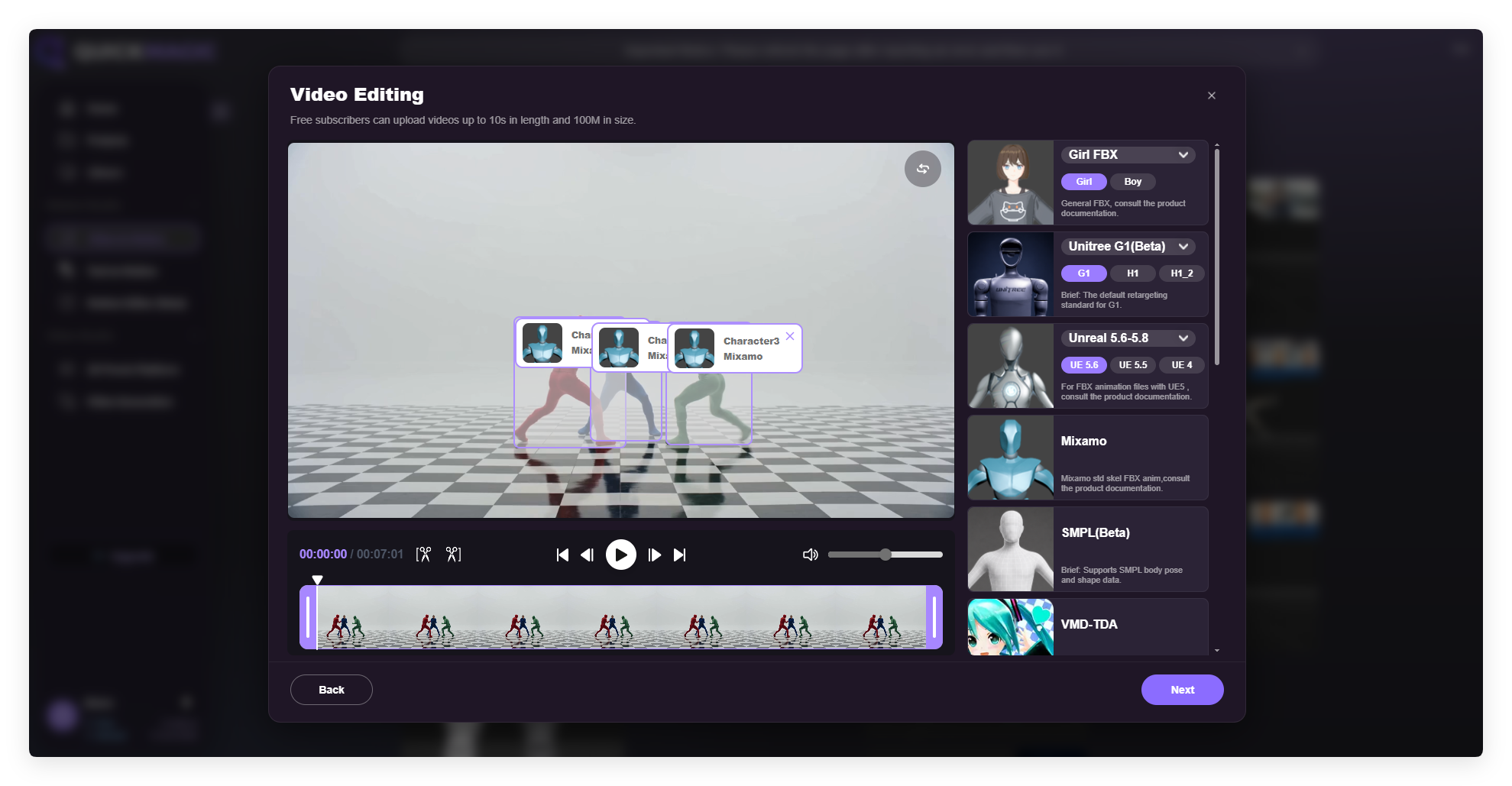
Confirm each performer box, assign the shared output preset and generate one independent skeletal track per selected identity.
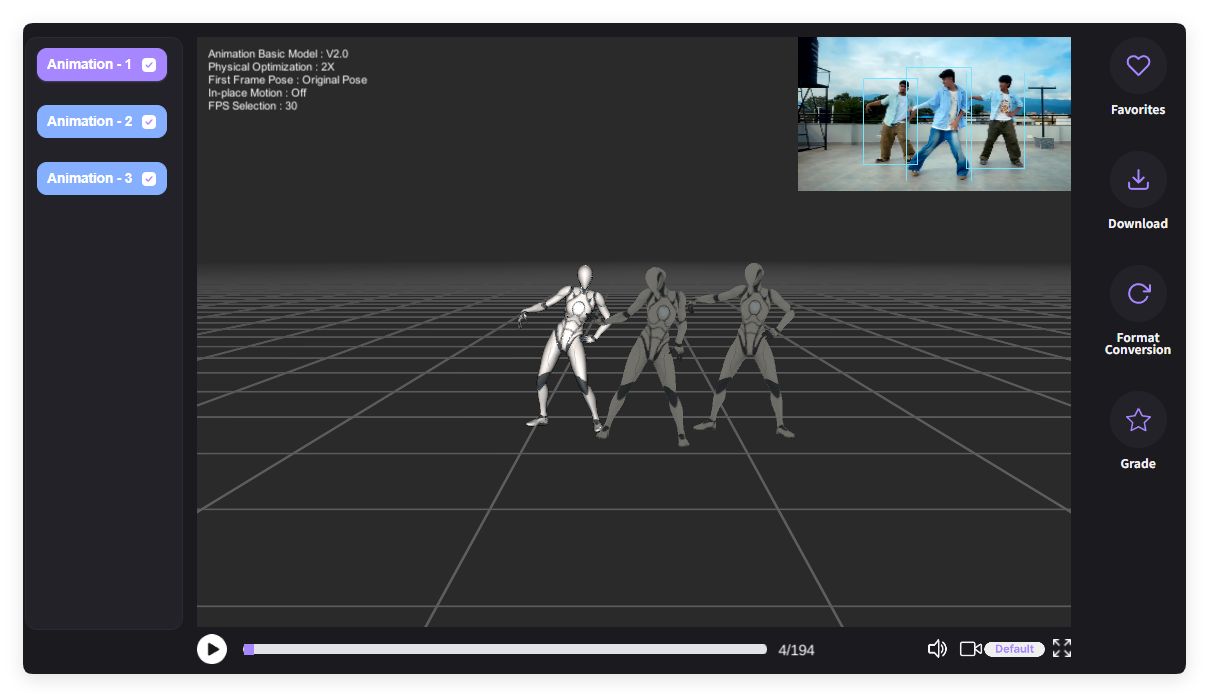
Map each source animation to its intended character, restore formation, correct contacts and bake the synchronized scene.
Each selected performer becomes one source track for a character. The official September 18, 2026 guide lists these maximum capture counts.
| Plan | Maximum source tracks per capture |
|---|---|
| Free | 1 character track |
| Basic | 2 character tracks |
| Pro | 3 character tracks |
| Max | 4 character tracks |
| Studio | 6 character tracks |
Plan names, limits and availability can change. Check the current QuickMagic account and pricing interface before committing a production workflow.
Each detected actor becomes a separate source skeleton that can drive one intended character without mixing the performances.
QuickMagic detects each visible actor independently so dialogue reactions, dance partners, opponents and teammates remain separate source tracks throughout processing.
Because every performance comes from the same video take, the independent tracks share the same action timing—useful for dialogue blocking, duets, fights and coordinated group scenes.
Export a compatible shared skeleton format, then map Animation 1, 2 and later tracks to the correct hero, NPC, avatar, digital human or other target rig.

QuickMagic reports roughly 70%–85% formation preservation. Adjust exact spacing, root paths, hand contacts, collisions and eye lines in your DCC before final delivery.

Official QuickMagic visuals show performer detection, shared-preset assignment and separate animation tracks ready for character retargeting.
It separates several performers in one video into independent skeletal-motion identities that can be assigned and retargeted to different 3D characters.
Multi-person mocap describes capturing several actors. Multi-character tracking emphasizes maintaining each actor's identity through export, retargeting and final character animation.
Yes. Each selected performer produces an independent result such as Animation 1, Animation 2 or Animation 3.
No. QuickMagic's guide states that one output format is used per task. Generate another task or convert the results when different target presets are required.
Verify performer boxes before processing, preserve clear track naming after export and map each source skeleton to its intended production rig.
They originate from the same source video and therefore share the captured take's timing. Preserve the common timeline when importing and retargeting.
QuickMagic reports roughly 70%–85% formation preservation. Refine exact spacing, root paths, eye lines and physical contacts in the destination DCC.
Keep every full body visible, use even lighting and clear contrast, reduce motion blur and avoid long periods where performers completely block one another.
Yes. Export tracks independently or use Motion Editor to insert or delete frames, replace actions and smooth transitions before final retargeting.
Dialogue blocking, dance duets, fight choreography, chase scenes, team sports, group cinematics, multi-character previs and digital-human interactions.

Generate editable 3D motion from a natural-language action, pose, or performance prompt.
Learn More →
Generate human-motion data for humanoid simulation and behavior design.
Learn More →Capture precise full-body movement from ordinary video without suits or sensors.
Learn More →


