


Upload Group Footage
Open Video to Mocap and upload footage containing several people. The official guide lists Free uploads up to 10 seconds and 100MB.
Convert one group-performance video into separate 3D motion tracks. QuickMagic automatically detects and boxes each person, lets you choose who to capture, and generates an independent editable animation for every selected performer.
Try Multi-Person Mocap →Multi-person video motion capture, also called multi-person mocap or group video mocap, extracts several performances from the same ordinary video. QuickMagic detects every visible person, draws an individual selection box and generates a separate skeletal-animation track for each performer assigned to the task.
Use it for group dance, fight choreography, ensemble acting, sports drills and multi-character previs. QuickMagic reports roughly 70%–85% formation preservation; exact blocking and character-to-character contacts may still need adjustment after export.
Upload the group performance, confirm automatic detection, assign one output format to the performers and export their separate animation tracks.
Open Video to Mocap and upload footage containing several people. The official guide lists Free uploads up to 10 seconds and 100MB.
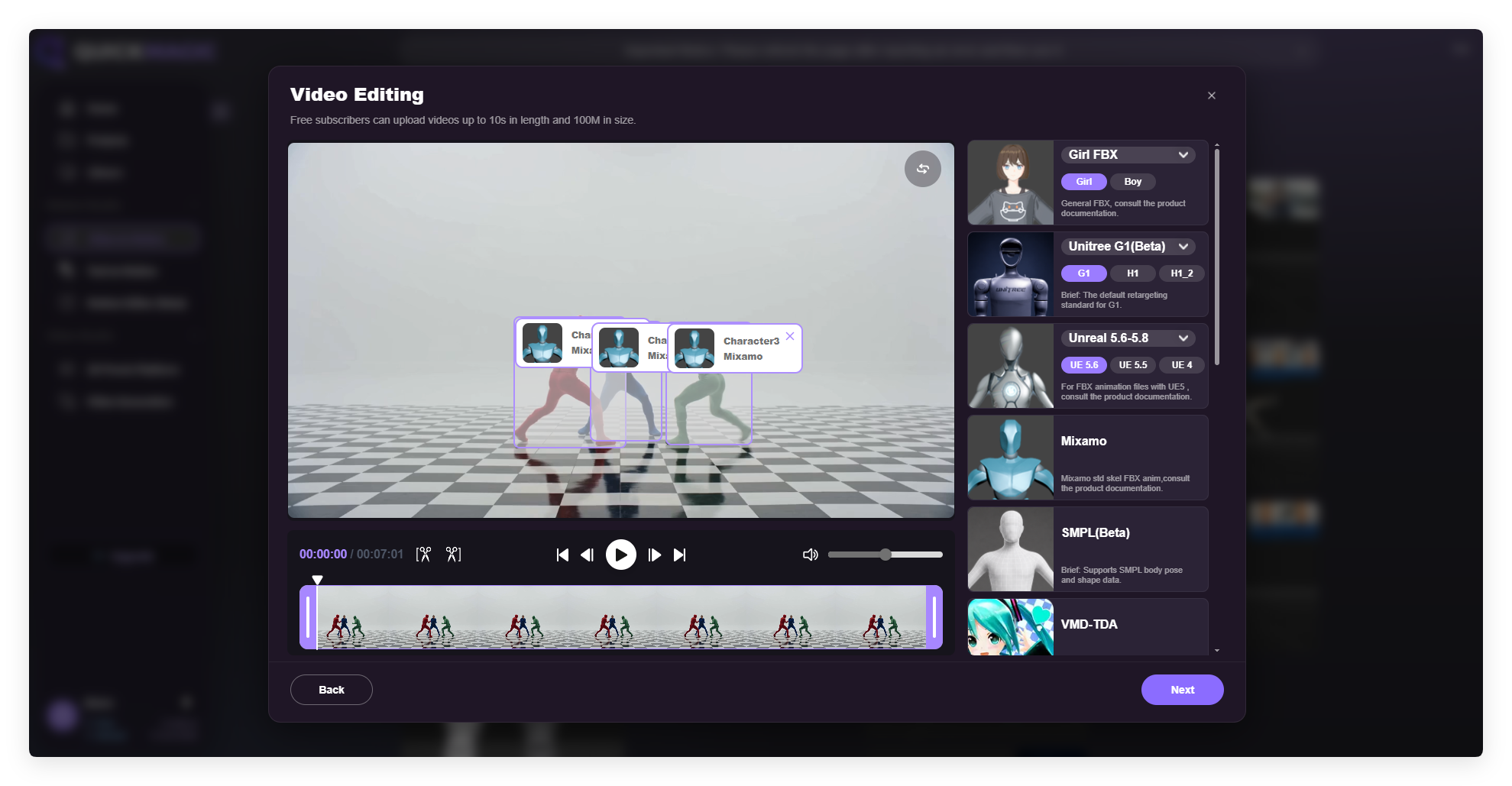
Verify every person is boxed, choose an available format and drag its card onto each performer you want to capture.
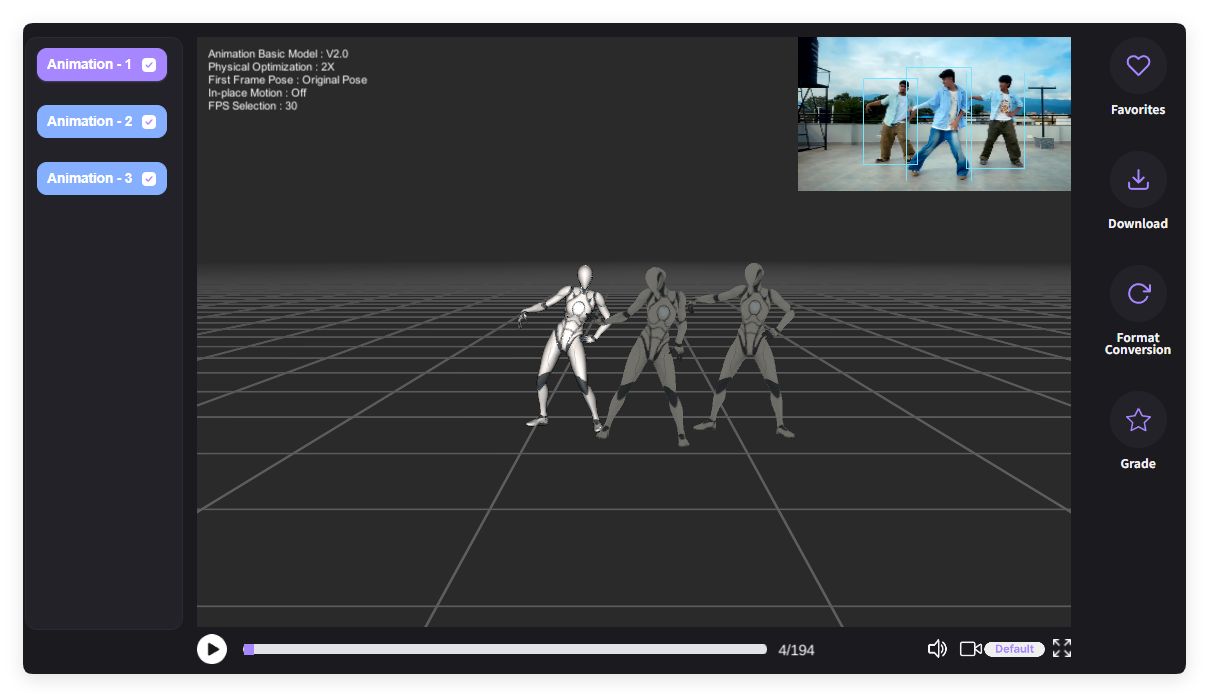
Click Next, allow extra processing time, then preview and export every independent animation result.
The official September 18, 2026 guide lists the following maximum number of people per capture.
| Plan | Maximum people per capture |
|---|---|
| Free | Single-person capture |
| Basic | 2 people |
| Pro | 3 people |
| Max | 4 people |
| Studio | 6 people |
Plan names, limits and availability can change. Check the current QuickMagic account and pricing interface before committing a production workflow.
The useful distinction is simple: QuickMagic automates performer detection and separate motion solving, while the animator remains responsible for final staging and contact cleanup.
Better source footage makes identity separation and motion estimation more reliable. Prepare the group take before uploading it to Video to Mocap.
| Format | Typical pipeline |
|---|---|
| Mixamo | Humanoid character animation and rapid prototyping |
| Unreal 5.6–5.8 | Real-time characters and virtual production |
| Girl FBX | FBX-based character animation workflows |
| SMPL | Body-model, research and data workflows |
The official guide states that all Video to Mocap formats support multi-person capture, but only one format can be selected per task.
QuickMagic separates performers into individual animation tracks while preserving much of their relative group formation.
After upload, QuickMagic detects visible people and outlines each one with a separate box. Confirm the count before selecting performers for processing.
Pick Mixamo, Unreal 5.6–5.8, Girl FBX, SMPL or another available format, then drag the format card onto one box for single-person capture or several boxes for multi-person capture. Everyone selected in that task shares the same format.
After processing, each performer receives an independent result such as Animation 1, Animation 2 or Animation 3, with the original reference video available for comparison.
QuickMagic states that roughly 70%–85% of reference formation is preserved. Fine-tune exact staging in your DCC, or use Motion Editor to insert or delete frames, replace actions and smooth transitions.
Official tutorial visuals show the complete path from automatic performer detection to independent animation results.
It uses AI to detect several people in one video and generate a separate editable skeletal-animation track for every selected performer.
The September 18, 2026 guide lists Basic up to 2 people, Pro 3, Max 4 and Studio 6. Free supports single-person capture. Check current pricing because limits may change.
The system automatically draws a box around each detected person. Drag an output-format card onto the boxes of the performers you want to capture.
No. One output format is specified per task and all selected people share it. Run another generation task or convert completed results when other formats are required.
The official guide says all Video to Mocap formats support multi-person capture and lists Mixamo, Unreal 5.6–5.8, Girl FBX and SMPL as examples. Available formats may change.
Yes. The completed result provides independent tracks such as Animation 1, Animation 2 and Animation 3 for preview and export.
QuickMagic reports roughly 70%–85% formation and positioning preservation. Refine exact blocking, distances and contacts in your DCC after export.
Keep every full body visible, use even lighting and clear subject-background contrast, limit motion blur and avoid performers blocking each other for long periods.
Each selected performer requires detection, motion estimation and an independent animation output, so processing normally takes longer as the number of people increases.
Yes. Captured motion can be opened in the Motion Editor for operations such as inserting or deleting frames, replacing actions and smoothing transitions.
Typical uses include group dance, fight scenes, ensemble acting, sports drills, multi-character previs, games, virtual production and digital-human animation.

Keep performer identities separate and retarget synchronized tracks to several characters.
Learn More →
Transfer captured motion from source skeletons to production-ready character rigs.
Learn More →Build editable character performances for games, film, previs and virtual production.
Learn More →Capture full-body movement from ordinary video without suits or wearable sensors.
Learn More →Convert recorded human performance into editable skeletal character animation.
Learn More →


